Layers
In our Design Time process the Logical DataModel drives the set-up of most physical datamodels. Each physical model is a representation of the data that resides in one of the technical layers of our Runtime environment. Understanding of this linkage is a key element of our solution.
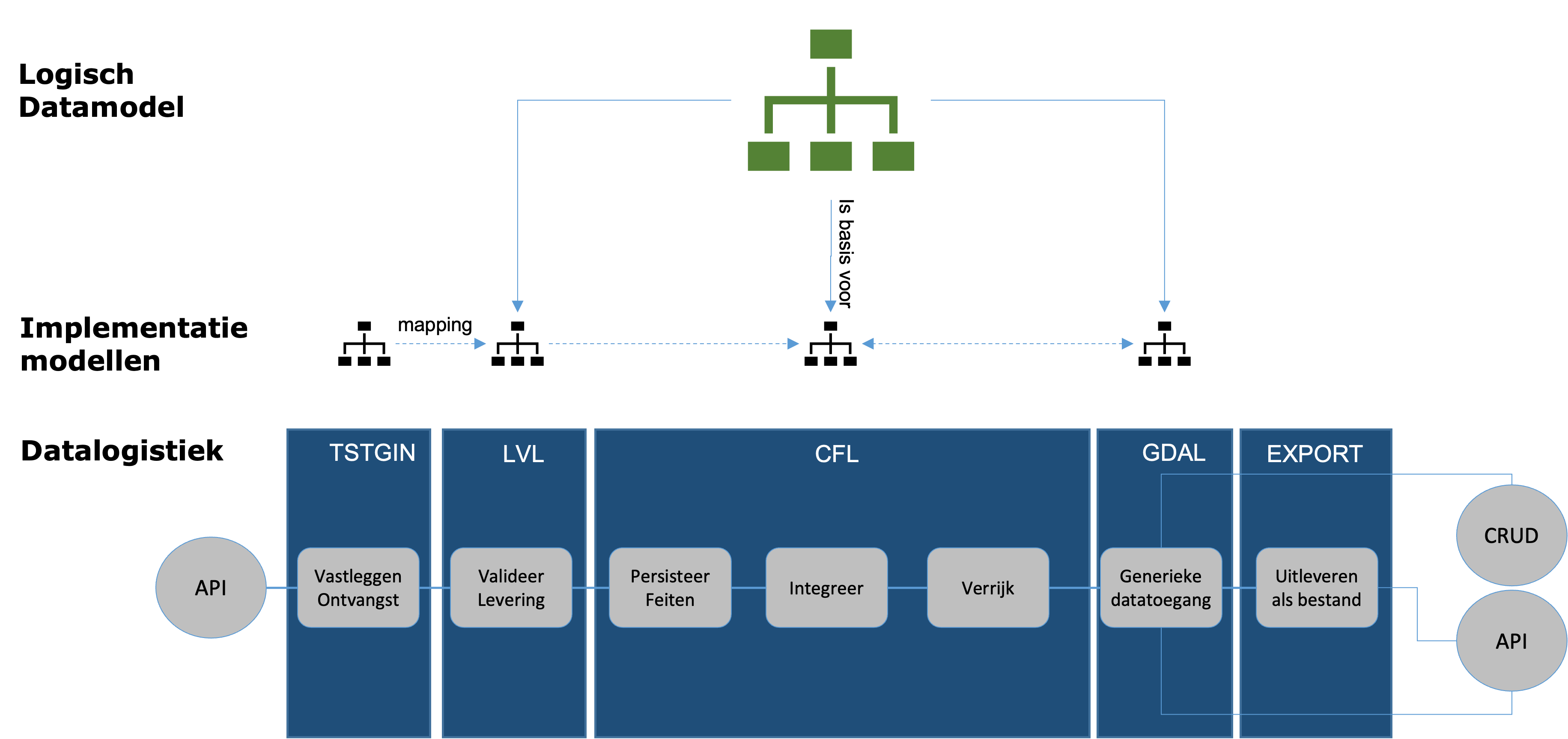
TSTGIN : Technical STaGing In
This layer is a separate database that represents the physical data delivery of the related tenant. The main purpose of this layer is to create a common starting point for further processing. It is expected this layer holds data in columns and rows.
This layer contains data from the last delivery and must be truncated at the start of each new delivery. The status of the delivery is managed through i-refactory API's. We therefore assume an external process orchestrates deliveries by means of our API's.
You can use this Layer to:
- Fix data problems in the sourcedata to prevent conflicts in the next layers
- Enriching information (e.g. code to value translations)
- Enrich metadata to capture knowledge of related sources
- Renaming columns toward Business Language - Often, we choose for source column naming, to keep lineage with sources as clear as possible. When source system uses confusing column names, we can give more descriptive names.
Info
This all to prepare the step from Technical Staging towards the Logical Validation Layer (LVL). Preparing in this layer avoid problems in LVL. In order to retain full lineage, all datafixes and enrichments must be captured in computed columns or derived entities.
LVL : Logical Validation Layer
The Logical Validation Layer (LVL) is the second layer in the chain and is initiated after the data has been fully transmitted to the Technical Staging In layer. The LVL layer is a separate database that services the following functions :
- Transforms the source data to the structure of the Logical Data Model
- Buffers the transformed data historically
- Validate deliveries and determine whether the delivery should be "accepted", "accepted with findings" or "rejected"
- Based on tresholds and defined actions non-compliant records can be skipped, non compliant attribute values can be removed or you can leave the non-compliant data as-is
- Automatically executes type conversions
A delivery gets “accepted with finding” when there are constraint violations present in the data, without exceeding any constraint threshold. A constraint threshold determines the number of occasions in which a constraint can be violated before the delivery receives the “rejected” flag.
Each constraint has a separate configurable threshold that describes the maximal allowed occurrences before a delivery is rejected, and an action that describes what to do when a violation occurs. In case the delivery is “accepted” or “accepted with findings” the data is prepared for handover to the next layer.
The actions that can be selected variates over the constraint types. For instance, a primary key constraint will not have the option to select ‘Empty column’ or ‘No action’, since it is for a database impossible to have an invalid or ‘NULL’ value as primary key. The possible actions are skip row, empty column or no action.
- The Skip row action will skip the entire row.
- The Empty column action will replace the value which caused a violation with an empty field (NULL).
- The No action does just simply nothing and accepts the current situation.
The Validation process
The data validation process determines the quality of the data by evaluating the constraints that are captured in the model. The constraints are grouped into a constraint type and are separated over two stages. At the end of each stage an intermediate evaluation is performed to determine whether any threshold exceeded.
The first stage covers the validation types that can be performed without requiring data from outside the delivered dataset itself. The validations that are performed during this stage are:
Primary key constraints
Determines whether entities in the dataset contain records with an identical primary key or combination of keys. (Possible actions: skip row)
Datatype constraint
This validates whether the value provided before the datatype conversion is identical to the value after the datatype conversion. Unsuccessful datatype conversions results in a NULL value, which causes a mismatch afterwards. (Possible actions: skip row or Empty column)
Mandatory constraint
This determines for each column that is specified as mandatory whether for each record has a value present. (Possible actions: skip row)
Enumeration constraint
This determines, after casting it to the correct datatype, whether the given value corresponds to a value in the enumeration set. (Possible actions: skip row, empty column or no action)
Attribute value constraint
This verifies for each imposed value constraint whether it complies to the user defined expression. (Possible actions: skip row, empty column or no action)
Record constraint
Checks for each imposed records constraint whether it complies to the user defined expression. (Possible actions: skip row or no action)
The output of the first phase of validations is initially stored in a temporary table. This temporary table is used to register the information of the witnessed violations in the ACME database and to determine whether the delivery should be rejected for exceeding a threshold. Only when the none of the threshold is exceeded the data is approved and transferred to the corresponding ‘UCLVL_BC’. These tables have an additional column ‘ACM_SKIP_ROW’ that indicates for which records the ‘skip row’ action is performed. The ‘no action’ and ‘empty column’ actions are column specific and the output of this action is already processed to its final state.
The second stage contains the constraints that requires additional data from outside the provided dataset. Missing data that is required to perform the validation is retrieved from the main dataset and appended to the validation dataset. For example, a delivery with data that references to a table that is only set once during the initially delivery can only be validated when this data is appended to the validation dataset. After all the missing datapoints are appended to the validation dataset the constraints are validated. The constraints that are validated during this phase are:
Alternate key constraint
Validates if there are multiple records with an identical set of alternate keys.
Parent relationship constraint
Validates whether there exists a parent for the given key value(s). (Possible actions: no action)
Child relationship constraint
Validates whether there exists a child for with the given key value(s). (Possible actions: no action). This constraint is only validated when a child relation is required.
Set constraint
Executes the user defined query that determines the incorrect records. (Possible actions: no action)
The result set of the second phase of validations is initially stored in a temporary table and used for violation registration and classification of whether the delivery should be rejected for exceeding a threshold. Only when none of the threshold is exceeded the data is transferred to the corresponding ‘UCLVL_SC’. These tables contain the final product of the two validation phases.
In case a delivery is accepted with or without findings the final step of updating the LVL dataset and transferring the data to the next layer (CFPL) is initiated. This process is performed by comparing the dataset stored in the UCLVL_SC tables with the current from the LVL, to construct a delta script that only contains the changes. This script is afterwards used to update the LVL itself and in placed in the queue for the next layer (CFPL). This allows the LVL and the CFPL to work concurrent and independent from each other. The LVL clears the data from the UCLVL_BC and UCLVL_SC and the whole process repeats for the next delivery.
Warning
Deliveries with key violations, data-type conversion violations or with validation issues above treshold will not be further processed and require mediation.
For deliveries with active validation, validation results are stored in our metadata.
CFL : Central Facts Layer
This layer is a separate database that services the following functions:
- data is stored historically and split into non-temporal key tables and temporal context tables
- integration of diverse sources is managed
- Business Rules that generate new facts are executed and results are persisted
- capture facts from LVL Layer and GDAL Layer - meaning it is the central fact repository of both batch and CRUD related transactions
The CFPL database is automatically populated by the I-Refactory load processor, that will generate the SQL code from the Logical Validation Layer to the Central Facts Layer from the metadata.
GDAL : Generic Data Access Layer
This is the access layer that makes the data as persisted in the CFL layer accessible for data consumption in various perspectives:
- current perspective that return current time perspective on data in a relational format
- historical perspective that include all transaction timelines in a relational format and
- the point-in-time perspective that helps to return data on a given (historical) point in time and
- brings all non-key related attributes together in one view (known as One Attribute Set Interface - OASI)
This layer is by default virtual and this layer also supports consuming data at the same time this layer is refreshed.
This layer also manages CRUD updates to the CFL layer by means of generated CRUD-triggers within the current perspective database views.
FILE_EXPORT : File Export Layer
This architecture layer groups together all tasks related to the file based exchange :
- based on an additional perspective made available in the GDAL layer that provides point-in-time access to an OASI view including business keys
- serves as a layer in the runtime monitor to monitor and manage all tasks related to the file based exchange
- serves as the architecture layer when defining data consumptions agreements
- serves as the architecture layer to use in the API call that creates the delivery