Create integrity mapping
You can use an integrity mapping:
- if the delivery is a partial delivery: Some entities are delivered at another time than other entities.
- if both entities are in the scope of one logical validation model.
- if the attributes involved in the integrity mapping are (part of) a key or refers to another entity (foreign key).
To create an integrity mapping
- Open the logical validation model (LVM) and the central facts model (CFM). Make sure the involved Anchor and Context are available in CFM.
- Open the mapping editor in the CFM.
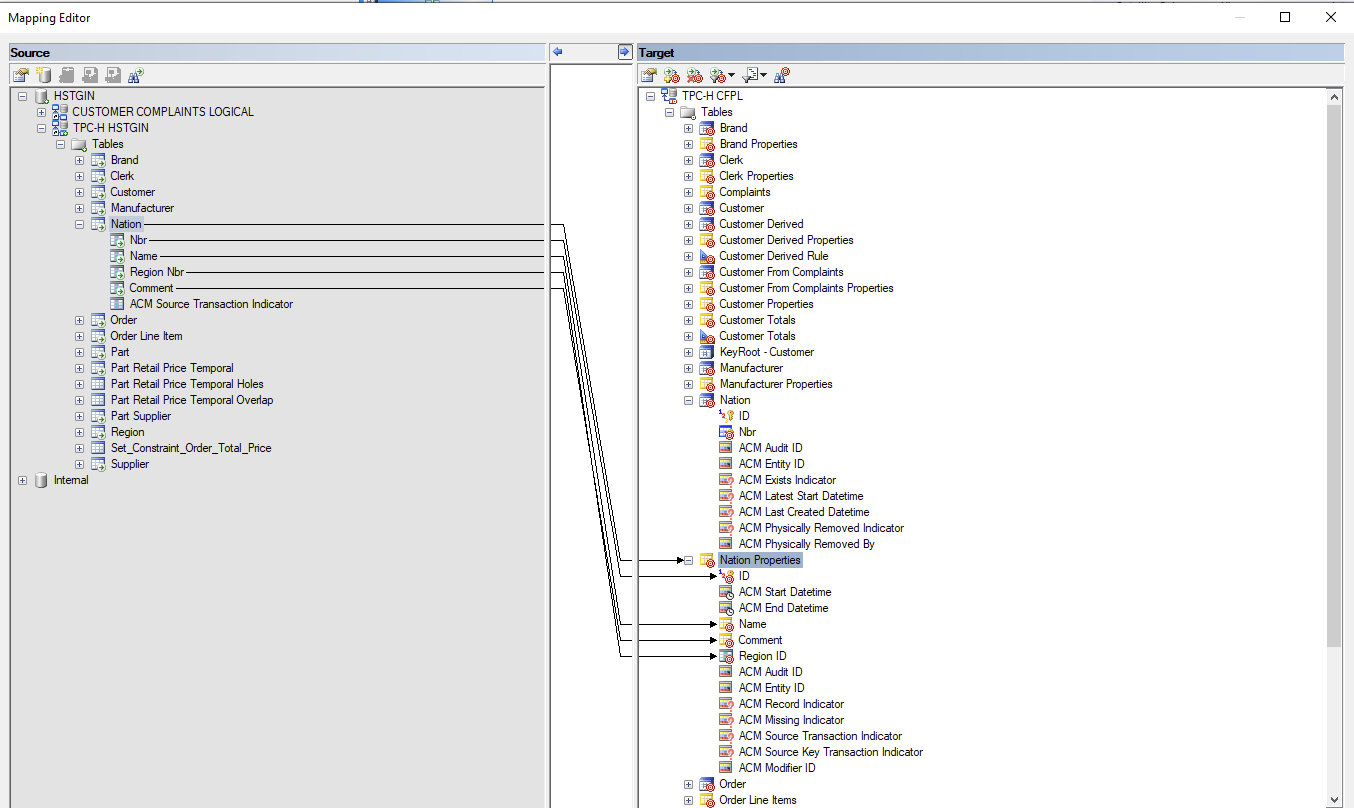
- It is assumed you already defined the mapping from the logical validation model to the Anchor that formally identify existence. This is a
master mapping, that must be available before you proceed with the integrity mapping. If not, map the business key of the logical validation entity to the Anchor business key and to the Context id.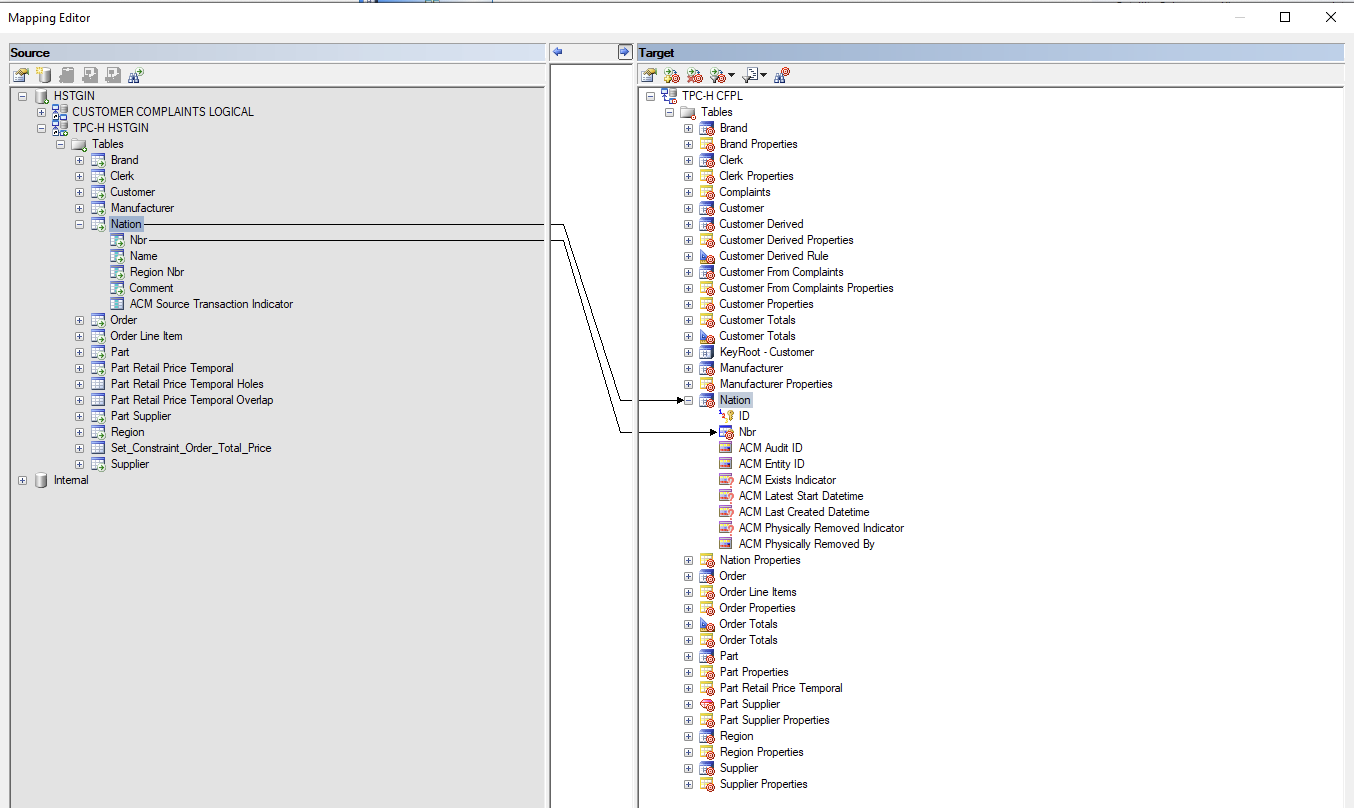
- Select the attribute for integrity mapping. Right click on the business key in the Anchor and select
Create mapping. A mapping will appear between the selected attribute in entity A and the Anchor of entity B. This is anintegrity mapping. You will see the suffix2 mappingsin the name of the entity.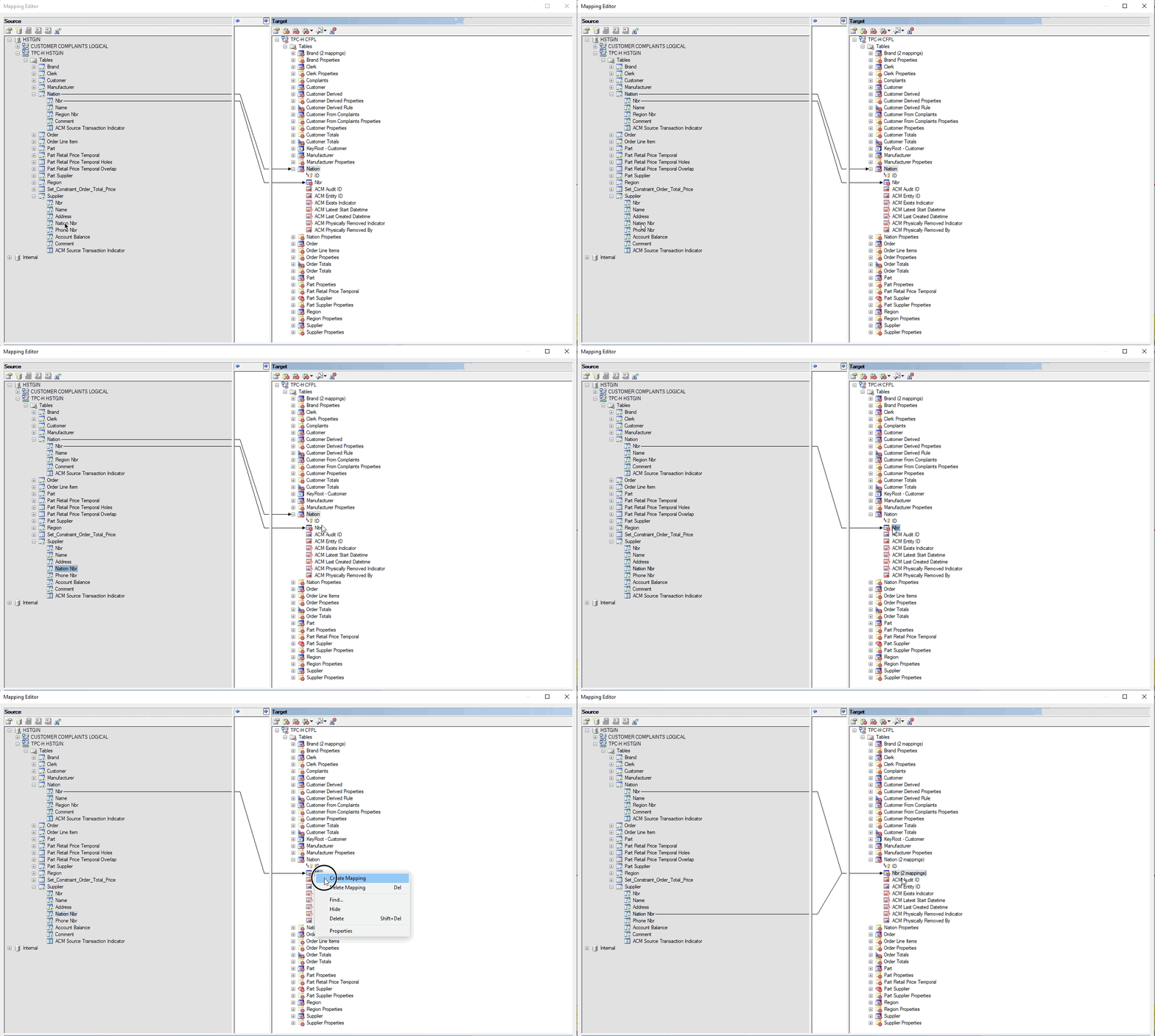
-
Repeat the integrity mapping if needed.
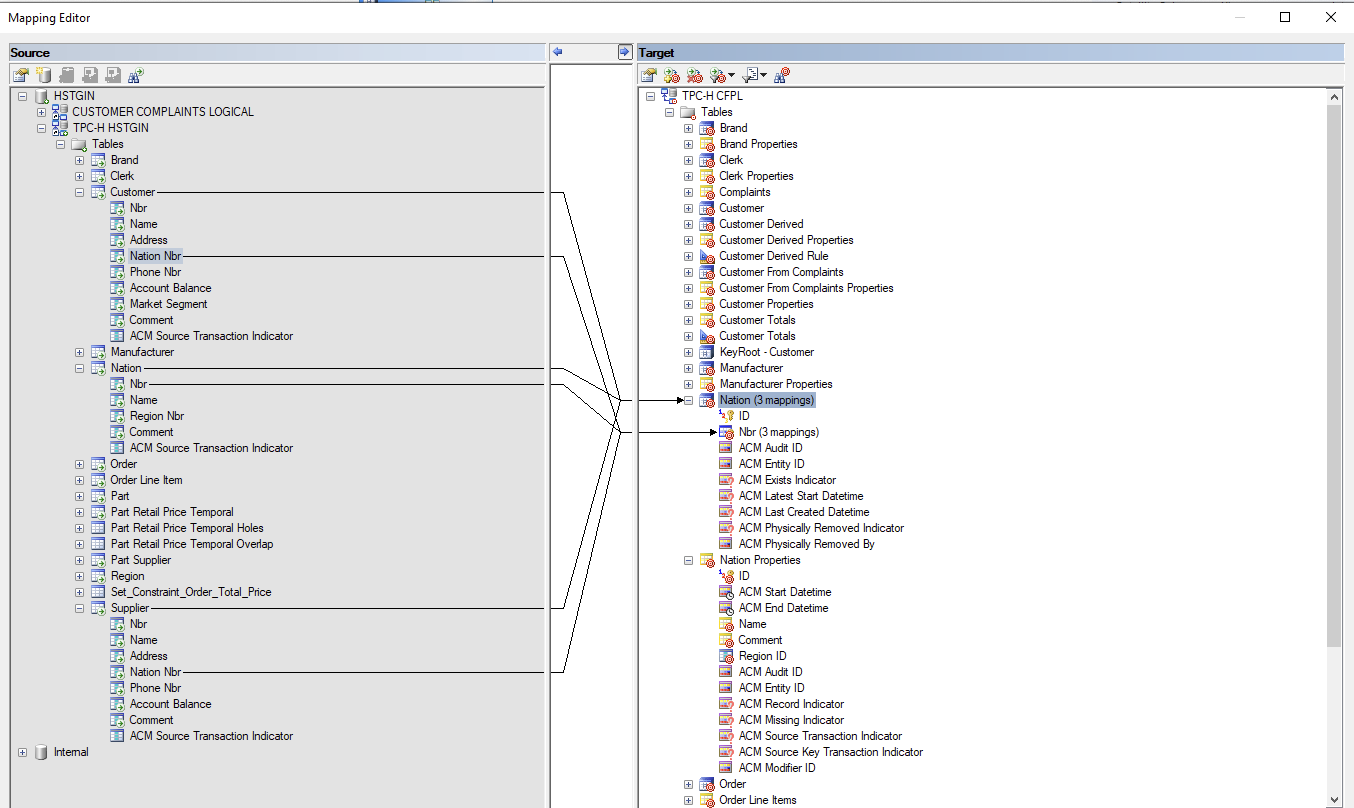
Warning
For integrity mapping: do not map the attribute to the Context. Only the master mapping consists of a mapping to the Anchor and the Context.
After completion of the model changes
Add a high threshold for the Parent Relationship constraint between entity A and B. This will ensure the delivery will Persist with Violated Constraints if at Time 1 entity B is delivered with a new value that does not yet exists in the primary key of entity A. 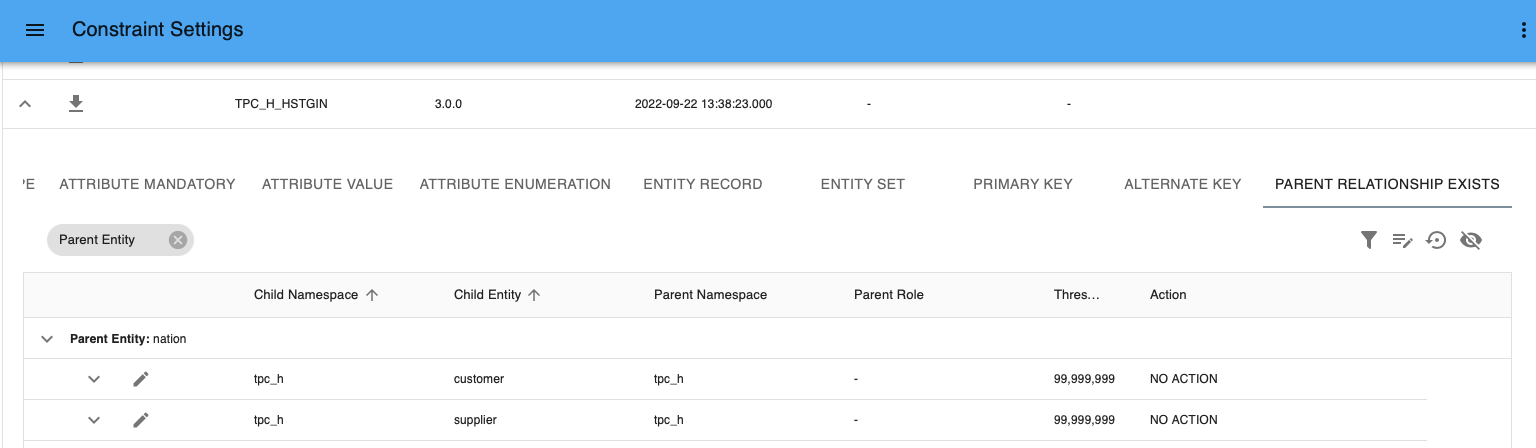
Example of an integrity mapping
Suppose in the Supplier delivery there is a reference to nation_nbr 004, but nation_nbr 004 is not (yet) delivered to the Nation entity.
Delivery 1: Nation
The following data is delivered to Nation:
Entity: Nation
| nation_nbr | name | region_nbr | comment |
|---|---|---|---|
| 001 | Nederland | 01 | |
| 002 | Duitsland | 01 | |
| 003 | België | 01 |
In the following tables you see the records in the CPL:
Anchor: h_nation
| id | nbr | acm_audit_id | acm_entity_id | acm_exists_ind | acm_latest_start_dt | acm_last_created_dt | acm_physically_removed_ind | acm_physically_removed_by |
|---|---|---|---|---|---|---|---|---|
| 1 | 001 | 10 | 201 | 1 | 2022-06-30 11:30:00.0000000 | 2022-06-30 11:30:00.0000000 | 0 | NULL |
| 2 | 002 | 10 | 201 | 1 | 2022-06-30 11:30:00.0000000 | 2022-06-30 11:30:00.0000000 | 0 | NULL |
| 3 | 003 | 10 | 201 | 1 | 2022-06-30 11:30:00.0000000 | 2022-06-30 11:30:00.0000000 | 0 | NULL |
Context: s_nation
| id | acm_start_dt | acm_end_dt | name | comment | h_region_id | acm_audit_id | acm_entity_id | acm_record_ind | acm_missing_ind | acm_source_transaction_ind | acm_source_key_transaction_ind | acm_modifier_id |
|---|---|---|---|---|---|---|---|---|---|---|---|---|
| 1 | 2022-06-30 11:30:00.0000000 | 8900-12-31 00:00:00.0000000 | Nederland | 1 | 11 | 202 | N | NULL | NULL | NULL | TPCH | |
| 2 | 2022-06-30 11:30:00.0000000 | 8900-12-31 00:00:00.0000000 | Duitsland | 1 | 11 | 202 | N | NULL | NULL | NULL | TPCH | |
| 3 | 2022-06-30 11:30:00.0000000 | 8900-12-31 00:00:00.0000000 | België | 1 | 11 | 202 | N | NULL | NULL | NULL | TPCH |
Delivery 2: Supplier
In a second delivery, Supplier is delivered:
Entity: Supplier
| nbr | name | address | nation_nbr | phone_nbr | account_balance | comment |
|---|---|---|---|---|---|---|
| 147381 | Jan Klaassen Beddengoed | Stationsstraat 14 | 001 | 010-3548745 | 27.79 | |
| 147382 | Ger Generator | Vel Strasse 3123 | 002 | 6455-135447 | 123.42 | |
| 147383 | Vera Vogelhuisjes | June Avenue 6 | 004 | 2542-137894 | -45.73 |
Nation and Supplier in CPL
In the following tables you see the records in the CPL:
Anchor: h_supplier
| id | nbr | acm_audit_id | acm_entity_id | acm_exists_ind | acm_latest_start_dt | acm_last_created_dt | acm_physically_removed_ind | acm_physically_removed_by |
|---|---|---|---|---|---|---|---|---|
| 1 | 147381 | 13 | 264 | 1 | 2022-06-30 11:44:12.7750000 | 2022-06-30 11:44:12.7750000 | 0 | NULL |
| 2 | 147382 | 13 | 264 | 1 | 2022-06-30 11:44:12.7750000 | 2022-06-30 11:44:12.7750000 | 0 | NULL |
| 3 | 147383 | 13 | 264 | 1 | 2022-06-30 11:44:12.7750000 | 2022-06-30 11:44:12.7750000 | 0 | NULL |
Context: s_supplier
| id | acm_start_dt | acm_end_dt | name | address | phone_nbr | account_balance | comment | h_nation_id | acm_audit_id | acm_entity_id | acm_record_ind | acm_missing_ind | acm_source_transaction_ind | acm_source_key_transaction_ind | acm_modifier_id |
|---|---|---|---|---|---|---|---|---|---|---|---|---|---|---|---|
| 1 | 2022-06-30 11:44:12.7750000 | 8900-12-31 00:00:00.0000000 | Jan Klaassen Beddengoed | Stationsstraat 14 | 010-3548745 | 27.79 | 1 | 14 | 265 | N | NULL | NULL | NULL | TPCH | |
| 2 | 2022-06-30 11:44:12.7750000 | 8900-12-31 00:00:00.0000000 | Ger Generator | Vel Strasse 3123 | 6455-135447 | 123.42 | 2 | 14 | 265 | N | NULL | NULL | NULL | TPCH | |
| 3 | 2022-06-30 11:44:12.7750000 | 8900-12-31 00:00:00.0000000 | Vera Vogelhuisjes | June Avenue | 2542-137894 | -45.73 | 4 | 14 | 265 | N | NULL | NULL | NULL | TPCH |
Because of the integrity mapping between the attribute nation_nbr and the business key in h_nation, there is an additional record (id = 4) in h_nation, where acm_exists_ind = 0.
Anchor: h_nation
| id | nbr | acm_audit_id | acm_entity_id | acm_exists_ind | acm_latest_start_dt | acm_last_created_dt | acm_physically_removed_ind | acm_physically_removed_by |
|---|---|---|---|---|---|---|---|---|
| 1 | 001 | 10 | 201 | 1 | 2022-06-30 11:30:00.0000000 | 2022-06-30 11:30:00.0000000 | 0 | NULL |
| 2 | 002 | 10 | 201 | 1 | 2022-06-30 11:30:00.0000000 | 2022-06-30 11:30:00.0000000 | 0 | NULL |
| 3 | 003 | 10 | 201 | 1 | 2022-06-30 11:30:00.0000000 | 2022-06-30 11:30:00.0000000 | 0 | NULL |
| 4 | 004 | 15 | 201 | 0 | 2022-06-30 11:44:12.7750000 | 2022-06-30 11:44:12.7750000 | 0 | NULL |
However, the id = 4 is not added to the Context of Nation:
Context: s_nation
| id | acm_start_dt | acm_end_dt | name | comment | h_region_id | acm_audit_id | acm_entity_id | acm_record_ind | acm_missing_ind | acm_source_transaction_ind | acm_source_key_transaction_ind | acm_modifier_id |
|---|---|---|---|---|---|---|---|---|---|---|---|---|
| 1 | 2022-06-30 11:30:00.0000000 | 8900-12-31 00:00:00.0000000 | Nederland | 1 | 11 | 202 | N | NULL | NULL | NULL | TPCH | |
| 2 | 2022-06-30 11:30:00.0000000 | 8900-12-31 00:00:00.0000000 | Duitsland | 1 | 11 | 202 | N | NULL | NULL | NULL | TPCH | |
| 3 | 2022-06-30 11:30:00.0000000 | 8900-12-31 00:00:00.0000000 | België | 1 | 11 | 202 | N | NULL | NULL | NULL | TPCH |
Find the missing business keys
There a several ways to find the missing or 'orphaned' business keys.
If the attribute involved in the integrity mapping is a foreign key, you can check the Delivery Statistics of the TPC-H delivery in the i-Refactory Web App. In the section 'constraint violations' and category class 'PARENT RELATIONSHIP EXISTS' of the relevant entities, you can see which foreign key in the child entity doesn't have corresponding key in the parent. 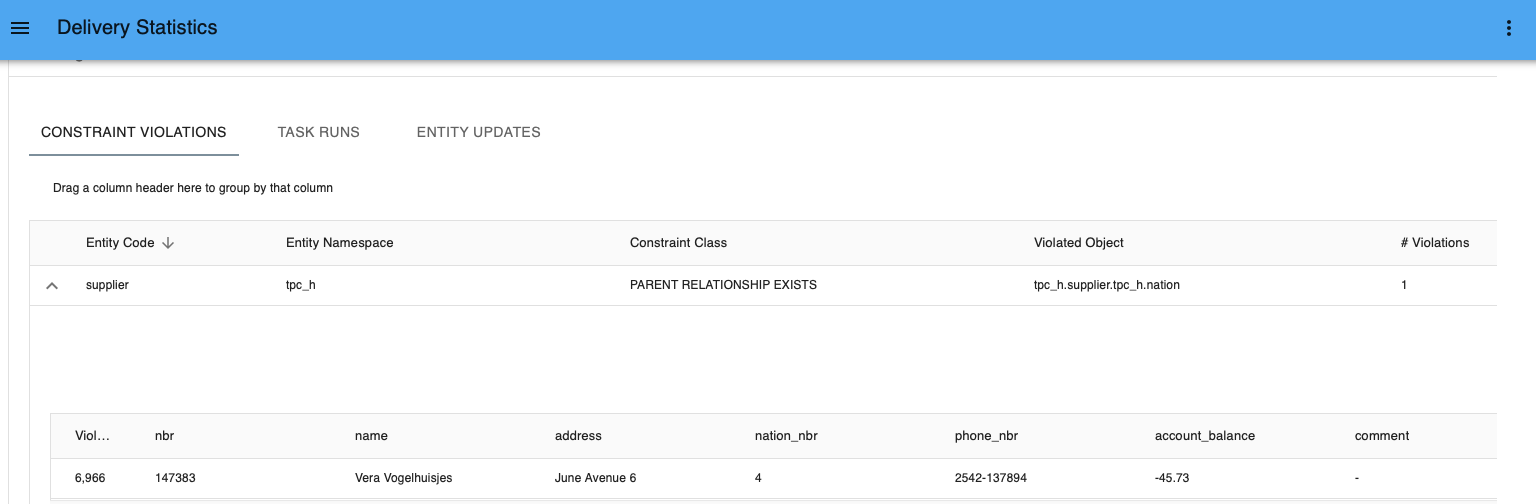
You can also look in the GAL oasi_bk view and filter for the records where the business key of Nation (nation_nbr) is empty:
USE IR_GDAL
GO

SELECT    [id]
        , [acm_start_dt]
        , [acm_end_dt]
        , [name]
        , [address]
        , [phone_nbr]
        , [account_balance]
        , [comment]
        , [nation_id]
        , [acm_entity_id]
        , [acm_record_ind]
        , [acm_modifier_id]
        , [nation_nbr]
FROM [tpc_h_oasi_bk].[supplier]
WHERE [nation_nbr] IS NULL
In the following oasi_bk view you'll see that the surrogate key of the Anchor is available (nation_id = 4) but the related business key nation_nbr is empty.
| id | acm_start_dt | acm_end_dt | name | address | phone_nbr | account_balance | comment | nation_id | acm_entity_id | acm_record_ind | acm_modifier_id | nation_nbr |
|---|---|---|---|---|---|---|---|---|---|---|---|---|
| 1 | 2022-06-30 11:44:12.7750000 | 8900-12-31 00:00:00.0000000 | Jan Klaassen Beddengoed | Stationsstraat 14 | 010-3548745 | 27.79 | 1 | 265 | N | TPCH | 001 | |
| 2 | 2022-06-30 11:44:12.7750000 | 8900-12-31 00:00:00.0000000 | Ger Generator | Vel Strasse 3123 | 6455-135447 | 123.42 | 2 | 265 | N | TPCH | 002 | |
| 3 | 2022-06-30 11:44:12.7750000 | 8900-12-31 00:00:00.0000000 | Vera Vogelhuisjes | June Avenue 6 | 2542-137894 | -45.73 | 4 | 265 | N | TPCH | NULL |