What are auxiliary relations?
When the logical model contains composite and overlapping keys, some of the subset constraints of the logical model may be lost in the central facts model. This has to do with the fact that all composite natural keys of the logical model are replaced by surrogate keys in the central facts model.
To enforce the subset constraints that have been lost as a result of this "surrogation process", it is necessary to add Auxiliary columns (columns with stereotype Auxiliary) and Auxiliary Subset References (relationships with stereotype Auxiliary Subset) to the generated GDAL model.
We distinguish between an Independent Auxiliary Relation and a Dependent Auxiliary Relation:
- For each independent entity, the auxiliary relation acts as a "Join Helper", which reconstructs the foreign key relation from the logical validation model.
- For each dependent entity, you reconstruct both the primary as well as additional business keys.
You need to add the Auxiliary Relations to entities in a certain order:
- Follow the dependency tree from top to bottom
- Add auxiliary relations to entities with dependent relations
- Add auxiliary relations to entities with independent relations
To summarize: follow the dependency tree top-down, from the top independent entity to the bottom dependent entity. For each entity, generate auxiliary relationships for dependent relationships first and then for independent relationships.
If you want to correct or remove the relations: follow the path in reverse.
Info
i-Refactory server uses the metadata of the auxiliary subset references to generate a {overlay} OASI Business Key perspective (oasi_bk) to better match the logical data model. The auxiliary columns in the oasi_bk views correspond to the parent business key columns.
In a normal generated GDAL view, the foreign key refers to the surrogate key. To get the business key, you have to join the foreign key of the child entity to the parent entity on the surrogate key. In the oasi_bk view this is already done.
Click here to see an example why auxiliary relations are needed.
Add auxiliary relations for dependent relations
- Right click on an Entity with dependent relations (red lines with the text
Dependent) - Select
i-refactory > Create auxiliary references for dependent relations
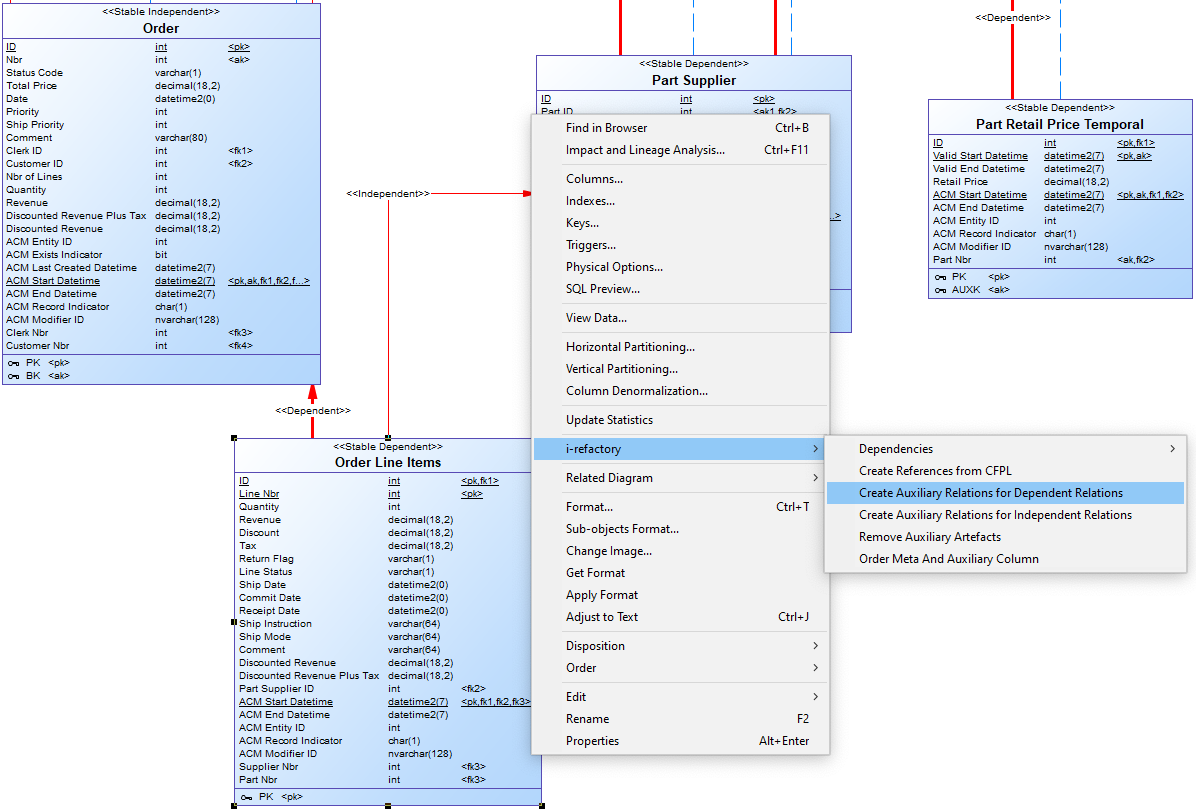
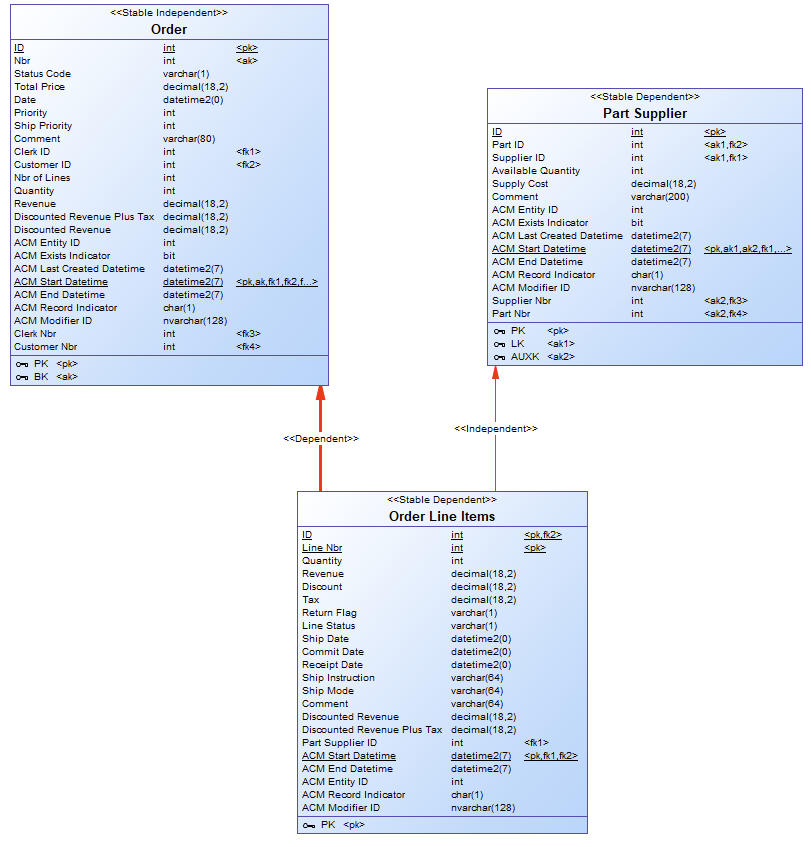
- Dependent auxiliary relations are created (blue dotted line). The business key of the related dependent entities is also added. In the example below, the attribute
Order Nbris added toOrder Line Items.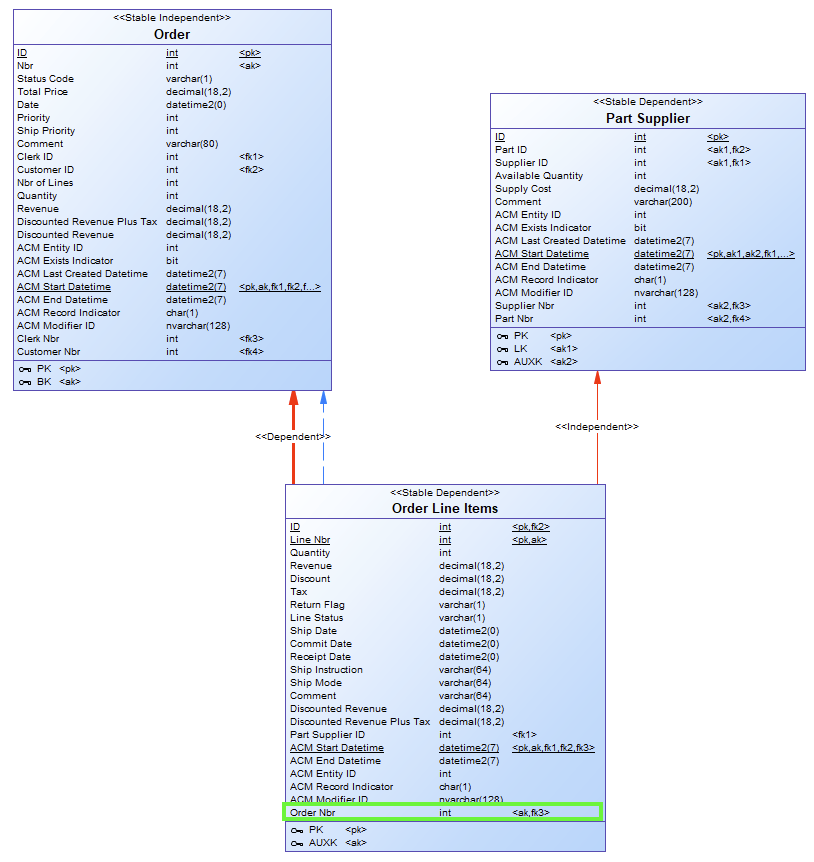
Add auxiliary relations for independent relations
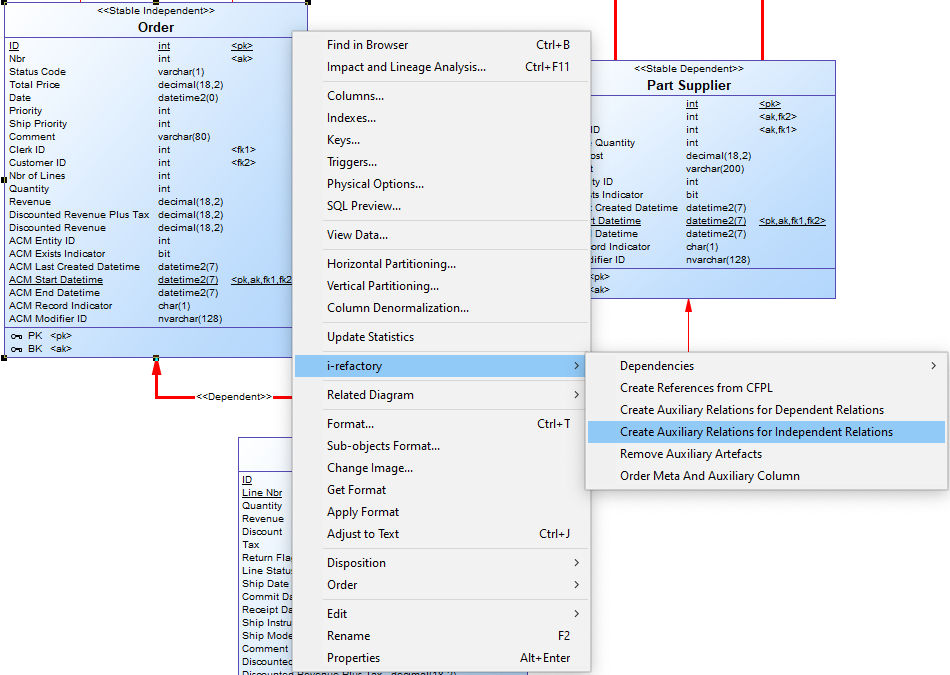
- Right click on an entity with independent relations (red lines with the text
Independent). - Select
i-refactory > Create Auxiliary Relations for Independent Relations
-
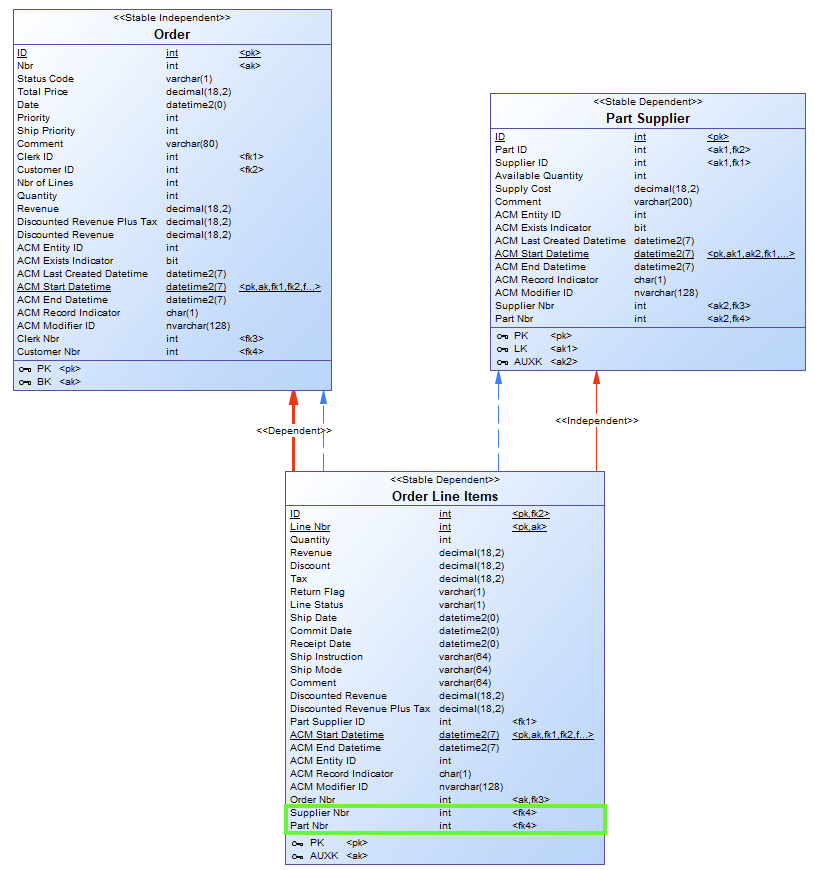
In the example below, you see a dependent entity (Stable Dependent Entity)with independent relations.
Order Line Itemshas an independent relation withPart Supplier(red line with the textindependent). If you add the independent auxiliary relation to theOrder Line Items, the composite business key (Supplier NbrandPart Nbr) is added to the entity.
-
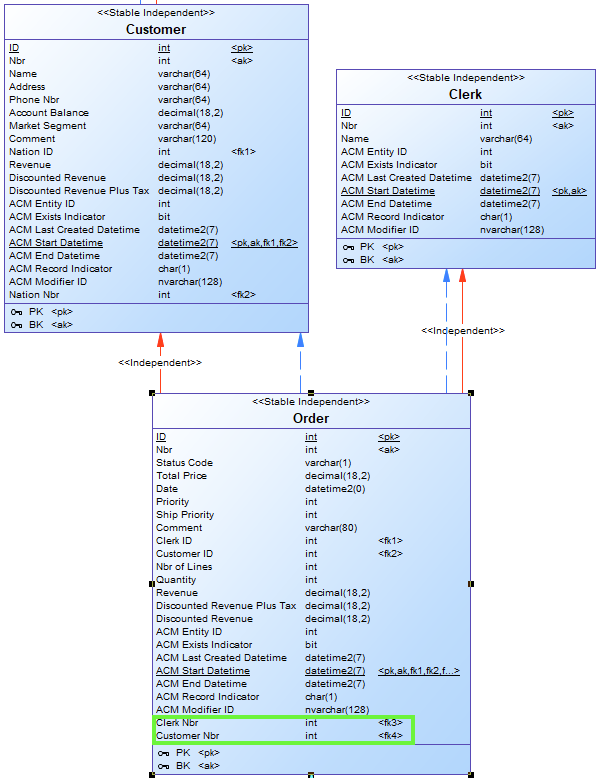
In the example below, you see a independent entity
Orderwith only independent relations. In the Stable Independent EntityOrderyou can see two attributes have been added: Clerk NbrCustomer Nbr
Check the auxiliary keys
If the auxiliary relations are generated, you can check if the business keys are correctly generated.
-
Check if the foreign keys from the logical validation model are generated in the entity. They are indicated with a
<fk>behind the attribute. -
Check if the primary keys from the logical validation model are generated in the entity as an alternative key. There are two ways to do this:
-
Visually: The alternative keys are indicated with a
<ak>bethind the attribute. - In the properties:
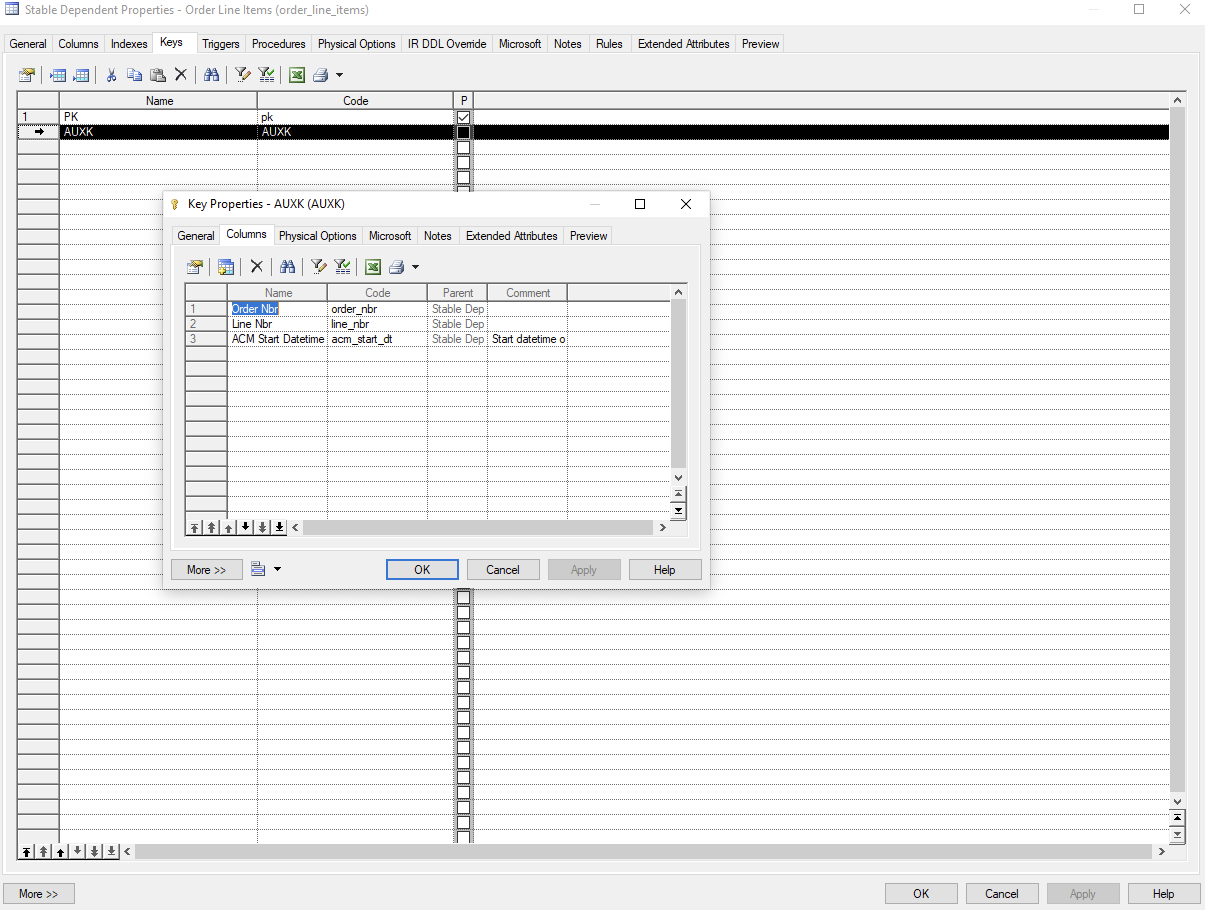
- Double click on an entity with auxiliary keys
- Open the tab
Keys - Double click on
AUXK - Open the tab
Columns. In this window you will see that this key consists of- the business keys (similar to the logical validation model) and
ACM Start Datetime.
Warning
If there are more auxiliary keys in the alternative key than in the Anchors of the central facts model, you need to check if you've followed the execution order of generating auxiliary keys correctly.
Remove auxiliary artefacts
- Right click on the Entity with auxiliary relations and keys
- Select
i-refactory > Remove auxiliary Artefacts 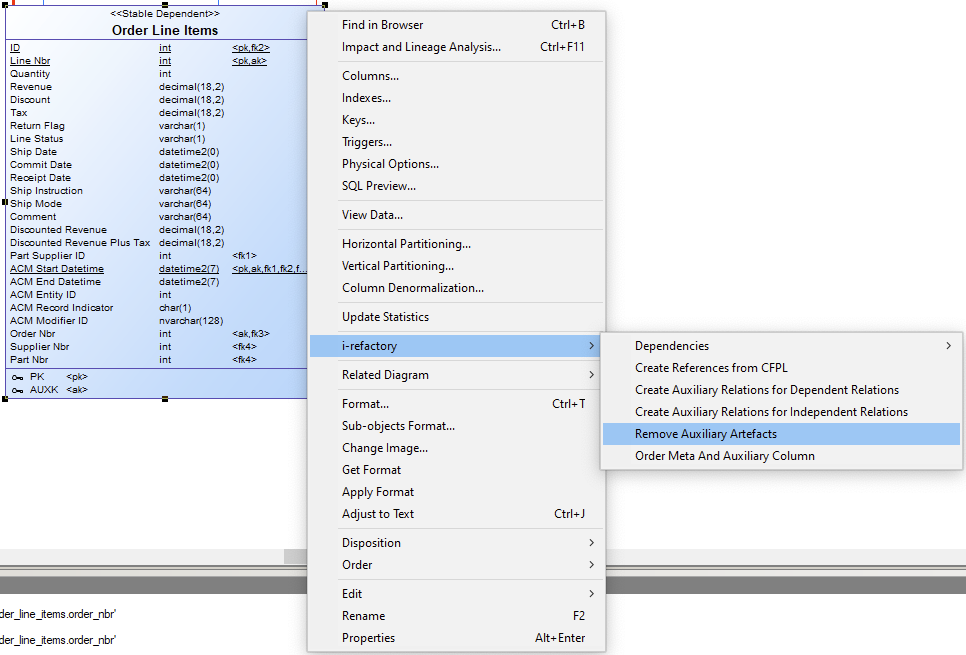
- All auxiliary artefacts of this selected entity dissapears.
Warning
If you get the error message "Cannot remove auxiliary artefacts. References to these artefacts exist.", check if there are other dependent relations from this entity. If this is the case: remove the auxiliary artefacts of the bottom entity first.