Assign entity set constraint to entity
To assign an entity set constraint to an entity:
- Go to you Diagram to select the relevant entity
- Right Mouse click:
Properties - Go to the tab
Rules - Click on
Add Objects - From the tab
Entity Set Constraintsselect the Rule you want to assign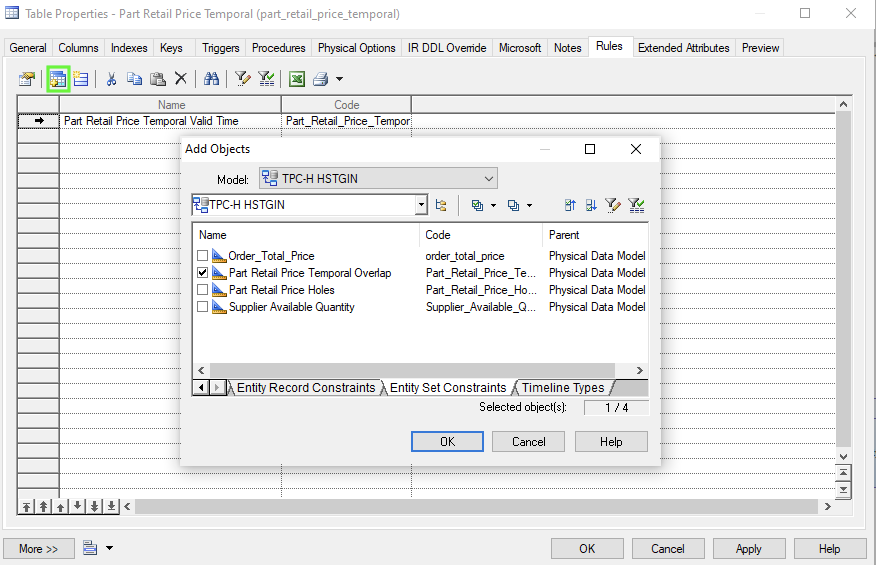
- Press OK when finished
Subtype Query
Best Practice: mutually exclusive subtype pattern
If you have subtypes in your logical data model, and the pattern is mutually exclusive, you need to add a set constraint.
In the following figure, you see that a Customer is either a Person or a Company. 
You need to know which values determine which subtype an instance belongs to. There are several ways to do this.
Suppose we add an attribute customer_type to differentiate between the two customer types. The possible values are 'Person' or 'Company'. To check if there are only Persons in the subtype Person, you need to create a Business Rule Helper and add the following query:
WITH QRY AS
(
    SELECT  C.[nbr]
         , C.[customer_type]
         , C.[acm_rownumber]
    FROM    [customer] AS C
            LEFT OUTER JOIN [person] AS P
            ON P.[nbr] = C.[nbr]
    WHERE   ((C.[customer_type] = 'Person' AND P.[nbr] IS NULL)
            OR (C.[customer_type] = 'Company' AND P.[nbr] IS NOT NULL))
)
The query:
- Does a left outer join between Customer and Person.
- It checks if customer_type in
Customeris equal to 'Person' and the primary key ofPersonis empty. If this is the case, than there is a 'Person' record in Company that is not in the subtypePerson. - It checks if customer_type in
Customeris equal to 'Company' and the primary key ofPersonis not null. If this is the case, than there is a 'Company' record inPerson.
Query overlapping timelines
Check overlapping valid times
If you have a bi-temporal entity in your model, it is advisable to check for overlapping valid timelines. See Allen's interval algebra for more information.
A timeline doesn't overlap if:
- Condition 1. Timeline X is completely after timeline Y
- Condition 2. Timeline X is completely before timeline Y
An overlap exists if neither condition 1 nor 2 is true: if one range is neither completely after the other nor completely before the other, then they must overlap. So:
- NOT(condition 1 OR condition 2)
According to De Morgan's law, this is equal to:
- NOT(condition 1) AND NOT(condition 2)
The following query returns all records in part retail price temporal that violates the set constraint.
WITH QRY AS
    ( SELECT
             [x].[nbr] AS nbr
           , [x].[valid_from] AS valid_from
           , [x].[acm_rownumber] AS acm_rownumber
        FROM [tpc_h].[part_retail_price_temporal] AS [x]
        JOIN [tpc_h].[part_retail_price_temporal] AS [y]
        ON   [x].[nbr]=[y].[nbr]
        AND  [x].[valid_from] != [y].[valid_from]
        AND  [x].[valid_from] < [y].[valid_to]
        AND  [x].[valid_to] > [y].[valid_from]
    )
The query:
- joins the table with itself:
xandyon the primary keynbr - it returns all records where:
- x.valid_from is not equal to y.valid_from.
- x.valid_from is earlier than y.valid_to. If this is the case, a timeline overlaps (violation of condition 1).
- x.valid_to is later than y.valid_from. If this is the case, a timeline overlaps (violation of condition 2).
List of related attributes or entities
When you select the constraint and use the right-mouse click menu option Impact and Lineage Analysis you can list the related attributes or entities.