Create helper
When you create a helper, it is very important that you select all entities relevant to the helper, i.e. the entity on which the constraint is checked and all other entities that are used in the query that implements the constraint. When you do this, i-refactory automatically creates the dependency mappings between the helper and the source entities used by the helper. There must be dependency mapping from all source tables used in the helper query to make sure that all source data is processed before the query is executed.
To avoid deployment errors, we advise you to start a new helper from scratch if you forget to include one of the additional entities during the creation of the helper.
To create a helper:
- Go to the Diagram to select the relevant entity
- Right Mouse click on the entity:
i-refactory > Helper Entity > Create Helper - Assign a meaningful and consistent name
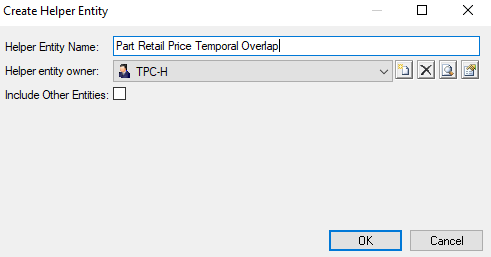
- Assign an owner
- Select Include Other Entities when you need additional Entities in your query
- Select the additional Entities to include (optional)
- Press OK
This will automatically generate:
- A helper on your Diagram, including dependency links to the included Entities

- A primary key in the helper that corresponds to the primary key of the entity you've created it from, as well as an internal id (ACM_Rownumber)
- A default query in tab
IR Derived Entityin the helper as a starting point
Warning
Never include shortcuts in your helper.
After you create the helper, you can make changes in the default query. However, it is important to use the default query structure.
Default query structure
The query you make must include the common table expression WITH QRY AS(). For example, if you create a helper on part_retail_price_temporal the following query is already composed. 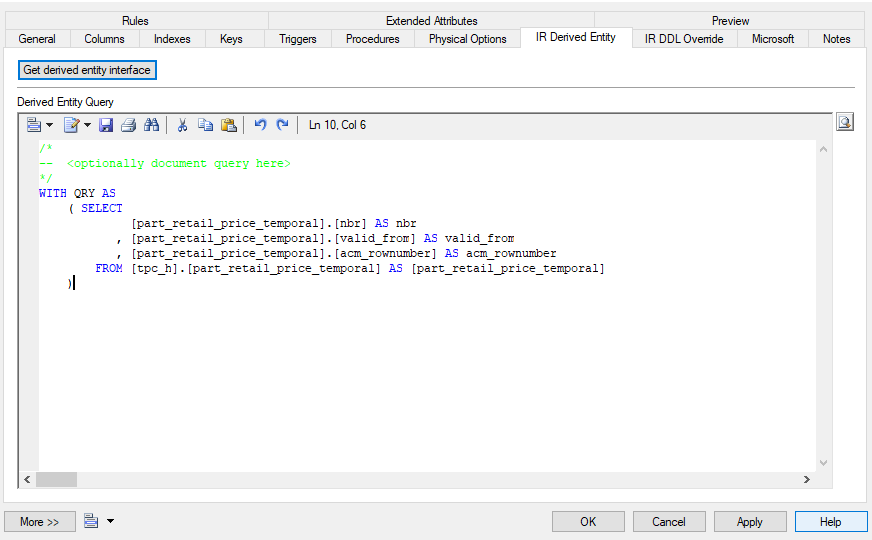
Warning
Do not change the primary key and acm_rownumber, always include these columns as part of query output.
After exporting DDL and metadata with the i-refactory menu, the generated sql query will look like this:
/*
--  <optionally document query here>
*/
WITH QRY AS
    ( SELECT
             [part_retail_price_temporal].[nbr] AS nbr
           , [part_retail_price_temporal].[valid_from] AS valid_from
           , [part_retail_price_temporal].[acm_rownumber] AS acm_rownumber
        FROM [tpc_h].[part_retail_price_temporal] AS [part_retail_price_temporal]
    )
SELECT  [nbr]
      , [valid_from]
      , [acm_rownumber]
FROM   QRY
GO