What's New in Release 3.7.0
Automated loading of CSV files into technical staging
When creating a delivery you now can specify to load CSV files automatically into the technical staging tables.
You can set values in the property csvLoaderSpecification. When this property is set the i-refactory engine will automatically load supplied CSV files from the location specified in uncPath into the appropriate technical staging tables for this specific delivery.
The property csvLoaderSpecification has the following schema:
csvLoaderSpecificationschema = {
    $id: '/acmDatadel/delivery/csvLoaderSpecification',
    type: 'object',
    properties: {
        uncPath: { type: 'string' },
        rowTerminator: { type: 'string', default: '0x0A' },
        fieldTerminator: { type: 'string', default: ',' },
        codePage: { type: 'string', default: '65001', nullable: false },
        firstRowIsHeader: { type: 'boolean', default: true },
        datafileType: { enum: ['char', 'widechar'], default: 'char' },
        fileExtension: { type: 'string', default: 'csv' },
    },
    additionalProperties: false,
    required: ['uncPath'],
}
For a detailed description of these properties please check the OpenAPI schema specification.
If you set a value (the only required value is uncPath) the i-refactory engine will automatically load the data, otherwise you need to load the data into the appropriate tables with your own tooling.
The i-refactory engine will immedatiately start loading the relevant files in parallel when auto-load is applicable.
If a required file cannot be read or if a file cannot be loaded with BULK INSERT the task will be set to FAILED (which you can monitor in the web app). The i-refactory engine does not move, remove or otherwise write to the specified uncPath.
You have the ability to REJECT the delivery while still in the loading phase. In this case already running technical load tasks will be completed but other technical load tasks will not be scheduled or processed. The delivery will be set in a REJECTING state and eventually to REJECTED.
This is an example of a delivery with csvLoaderSpecification properties set:
{
    "architectureLayerCode": "HSTGIN",
    "interfaceCode": "TPC_H_HSTGIN",
    "tenantCode": "TPCH",
    "receivedDt": "2018-01-01T00:00:01",
    "sentDt": "2018-01-01T00:00:00",
    "snapshotDt": "2018-01-01T00:00:00",
    "isComplete": true,
    "constraintsToValidate": "ALL",
    "violatedConstraintMaxSampleSize": 50,
    "logicalValidationDeliveryDeleteType": "LOGICAL",
    "deliveredEntity": [],
    "csvLoaderSpecification": {
        "uncPath": "//Mac/home/i-refact-demo-tpch/deliveredData/orderSystem/delivery-report-load",
        "codePage": "raw",
        "fieldTerminator": "|",
        "firstRowIsHeader": false,
        "fileExtension": "tbl"
    }
}
After succesfull acceptance of the delivery the monitor shows the generated load tasks to the technical staging tables. In the example monitor you can see some have them are succeeded, processing and scheduled. The number of parallel load tasks dependents on the concurrency settings.
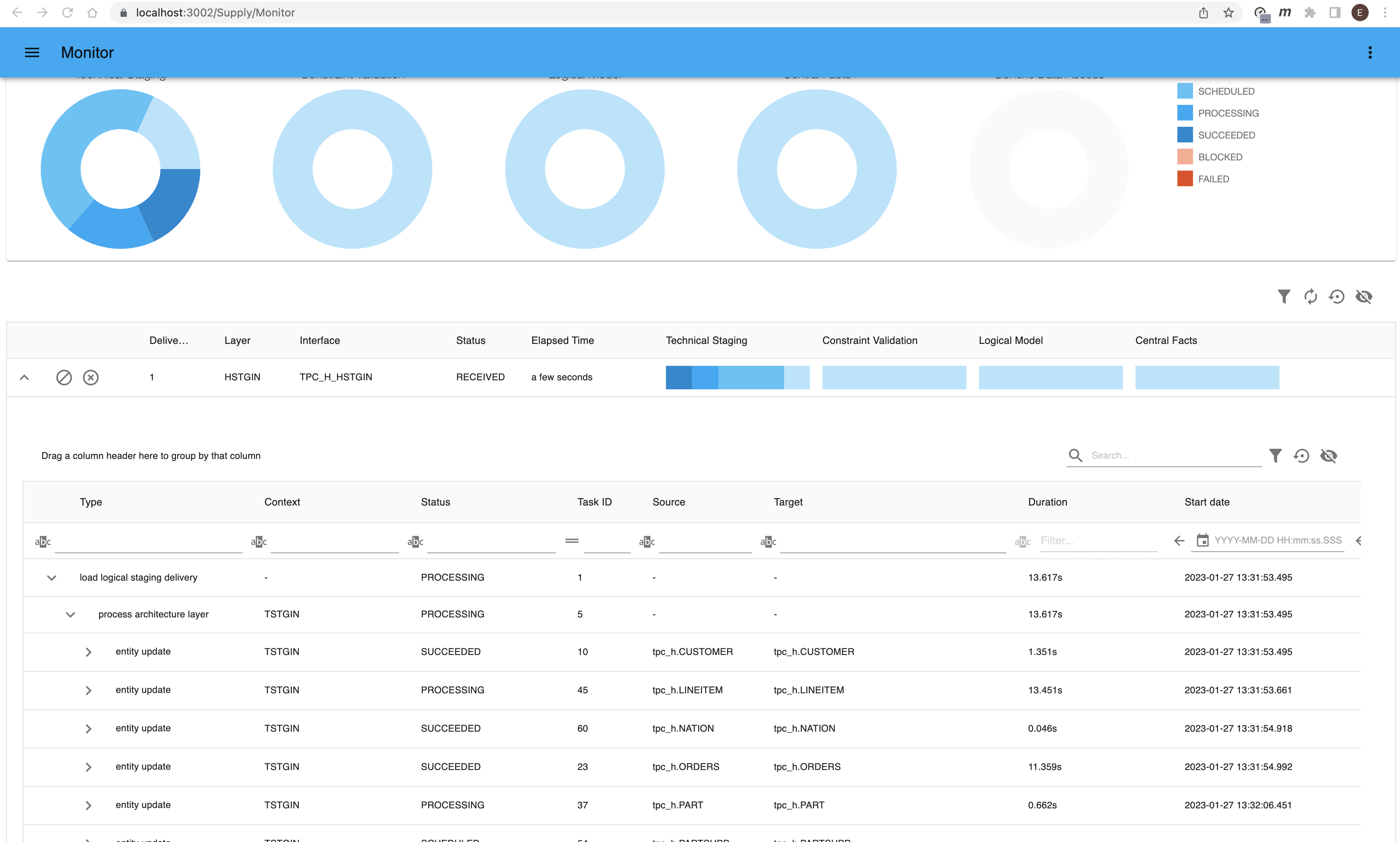
You can look into the load task and check the generated SQLServer code and csvLoaderSpecification settings:
/**
 * i-refactory version                           : 3.7.0
 * Generated for entityUpdate(auditId)           : 16
 * SourceArchitetureLayer                        : EXT
 * SourceInterface                               : TPC_H_TSTGIN
 * SourceEntity                                  : IR_TSTGIN.tpc_h.LINEITEM
 * SourceEntityClassification                    : STABLE DEPENDENT
 * TargetArchitetureLayer                        : TSTGIN
 * TargetInterface                               : TPC_H_TSTGIN
 * TargetEntity                                  : IR_TSTGIN.tpc_h.LINEITEM
 * TargetEntityClassification                    : STABLE DEPENDENT
 * CsvLoaderSpecification.uncPath                : /var/opt/home/i-refact-demo-tpch/deliveredData/orderSystem/delivery-report-load
 * CsvLoaderSpecification.rowTerminator          : 0x0A
 * CsvLoaderSpecification.fieldTerminator        : |
 * CsvLoaderSpecification.codePage               : raw
 * CsvLoaderSpecification.firstRowIsHeader       : false
 * CsvLoaderSpecification.datafileType           : char
 * CsvLoaderSpecification.fileExtension          : tbl
**/

TRUNCATE TABLE "IR_TSTGIN"."tpc_h"."LINEITEM";

BULK INSERT "IR_TSTGIN"."tpc_h"."LINEITEM"
FROM '/var/opt/home/i-refact-demo-tpch/deliveredData/orderSystem/delivery-report-load/LINEITEM.tbl'
WITH (TABLOCK, DATAFILETYPE='char', FORMAT='CSV', FIRSTROW=1, FIELDTERMINATOR='|', ROWTERMINATOR='0x0A', CODEPAGE='raw')
;
Prerequisites
Making use of the autoload option has some restriction:
- It is only supported on SQLServer 2019 or higher. If you try to create a delivery with a value set for
csvLoaderSpecificationon SQLServer version 2017 or 2016 a functional error is returned. - Tables specified in the technical model cannot contain computed columns.
- The CSV file should supply all columns specified in the technical table and in the same order as the column order of the table.
- For each table for wich is load task is created a file should exists in uncPath with a name matching the code-property of the technical table. Proper casing of filenames is required. If other files exists in uncPath, they are simply ignored.
- The SQLServer application user which is used in the i-refactory config should have read access to the uncPath.
- The CSV files should be compliant to the RFC 4180 standard.
Minimal specification
You only need to specify uncPath. The other properties will be initialized with their default values:
- By default the file contains a header. In this case the first line of the file will be skipped.
- By default we expect a comma as field seperator.
- By default we expect a linefeed a row seperator.
- By default we expect files are encoded as UTF-8 (codepage: 65001).
- By default we expect files do not contain multi-byte characters (UTF-16).
- By default we expect files have an extension "csv".
If your CSV files are encoded in another codepage, have a different field or row separator you need to set the appropriate values when creating the delivery.
UTF-16
If you your files are UTF-16 encoded files they should have a byte order mark.
You also need to set datafileType to widechar and change the setting of rowTerminator to 0x0A00 or another rowTerminator setting.
Although the SQLServer documentation specified it complies to the RFC 4180 standard there is an issue when UTF-16 files are provided. The last line of a file needs to have a rowTerminator (end of file only does not work). If the last line does not have a rowTerminator this last line will not be loaded.
SQLServer on Linux
Loading CSV files on SQLServer running on Linux has additional limitations:
- You cannot set the codePage to a value other than
raw. - So in case you have UTF-8 encoded files you need to convert them to UTF-16 (with a byte order mark).
Read access to files
The Tedious driver which we use to connect to SQLServer supports the following connection types:
- default => connect with a SQLServer account/password
- ntlm => connect with a Windows account and the NTLM protocol
- Azure connections types (for further explanation see the Tedious driver documentation): azure-active-directory-default, azure-active-directory-password, azure-active-directory-access-token, azure-active-directory-msi-vm, azure-active-directory-msi-app-service, or azure-active-directory-service-principal-secret.
If files needs to be accessed on for instance a fileshare there are limitations in how to access these files.
- If a connection is made with a SQLServer account the SQLServer instance should be started under a specific domain account. And this specific domain account should be granted access to the fileshares. SQLServer will delegate the bulk insert statement to the domain account under which SQLServer has been started.
- If a connection is made through NTLM (with a Windows account) you cannot access files on a remote fileshare. This is caused by the fact that SQLServer needs to access another server and needs to pass the original credentials of the user requesting this access. When an NTLM connection has been established there is no way of passing the password to the other server. SQLServer in this case will attempt an anonymous logon. The server will reject file access for anonymous logins resulting in a BULK INSERT statement error. Loading of files in this case is only possible if the files can be accessed without authentication (store locally, ...).
To allow for delegated access to another server a connection based on Kerberos is required. Unfortunately the Tedious driver does not support Kerberos based authentication. We are currently investigating the ability to connect through ODBC with Kerberos authentication support. For bulk loading data we will then use the ODBC based connection while still relying on the Tedious driver for the rest of the application.
Performance improvement Generic Data Access views
The i-refactory engine stores data over time. For the GDAL current views (CRUD) and GDAL business key views which read the data in the fact store we need to apply a filter to only retrieve the latest version which is not logically removed.
The generated query in the view made use of a self join to determine which versioned record is the actual (or latest version). This query is quite expensive (due to the fact it needed a join).
In this release we changed the query such that it uses the value of acm_end_dt to get the latest version.
Queries (especially when retrieving large sets) now on average consume 75% less CPU, the amount of logical reads is reduced with 90% and the elapsed time is reduced with 78%.
The read performance improvements do come at a small cost of additional storage and write throughput. An additional index is automatically created on each context table which tracks changes over time. This index is automatically created upon importing a fact based model in case this index does not yet exist.
Bug Fixes
| Issue | Summary |
|---|---|
| datatype truncation | Applying where conditions on datetime columns in the Rest API resulted in truncation to scale 1 when a more precise scale value was supplied (ie milliseconds). |
| flush transaction errors | In case SQLServer reported a primary key violation error it also reports the record that caused this violation. When this reported record contains multibyte characters the i-refactory engine was not capable of storing the error message resulting in a flush transaction error. The error message property in the database was of datatype varchar and is now changed to nvarchar where applicable. |