Adjust settings for valid times
For each column that is treated as valid time you:
- Go to the logical validation model diagram
- Double Click on the relevant entity
- Go to the tab
Columns - Right click with the mouse on the valid time attribute:
- Select
i-refactory > Staging > Make valid start columnfor all valid start columns - Select
i-refactory > Staging > Make valid end columnfor all valid end columns - Select
i-refactory > Staging > Make Normal Columnto turn a valid time column into a normal column 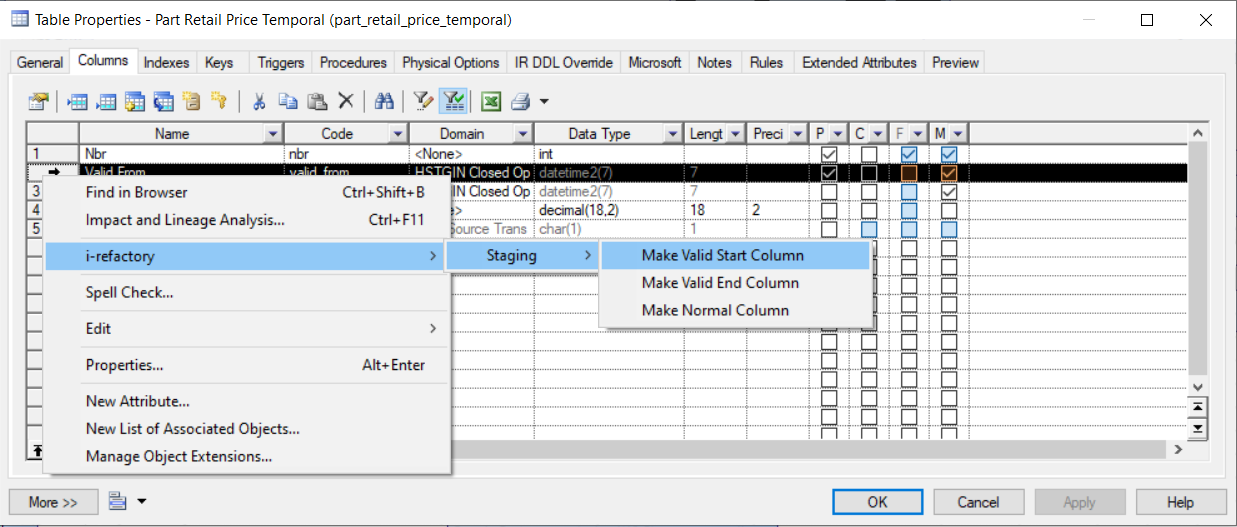
The Domain HSTGIN Closed Open Valid Start/End is assigned to the affected columns. Closed Open means that the record is valid from (vanaf in Dutch) the supplied valid start date until - but not including - (tot in Dutch) the supplied valid end date. In practice, this means that the start date of a valid time record is equal to the end date of the previous valid time record.
Example
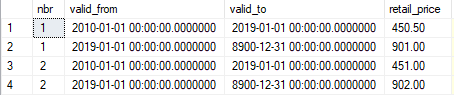
Consider the following timeline for the retail prices of a given part.
- Part number 1 has two retail prices in the database: 450.50 and 901.00
- The retail price of 450.50 is valid from 1 January 2010 to 1 January 2019.
- On 1 January 2019 the Retail price of Part nbr 1 is 901.00.
Warning
i-refactory will check if acm_valid_end_dt is greater than acm_valid_start_dt in the database. It will also check if the valid time of the delivered records doesn't overlap with the existing records in the central facts layer.
It is a good practice to add a set constraint to check for overlapping valid times in the current delivery. You might also want to add a check on gaps between the valid times.