What's New in Release 3.0.0
With the release of Powerdesigner Modeller 3.0.0.rc2 we've made a variety of functional and usability improvements.
Summary of changes
| Feature | Summary |
|---|---|
| Model Templates | Ability to create a new model with all predefined settings applied. |
| Physical Delete | Physical delete support in Unified Anchor Models. |
| Export | Export specific models. |
| Code Generation | Changes in code generation and installers. |
| GDAL Generation | Generation of Generic Data Access models. |
| Other Changes | Other minor improvements and changes. |
Model templates
Creating a new model for each of the i-refactory specific layers is now supported with model templates.
Model templates will bring the advantage of using the same settings which leads to higher level of standardisation, reuse and comprehension.
The tedious work of manually setting values for default and standard properties is now taken care of with a model template.
Activate
Powerdesigner menu Tools → General options → Model Creation:
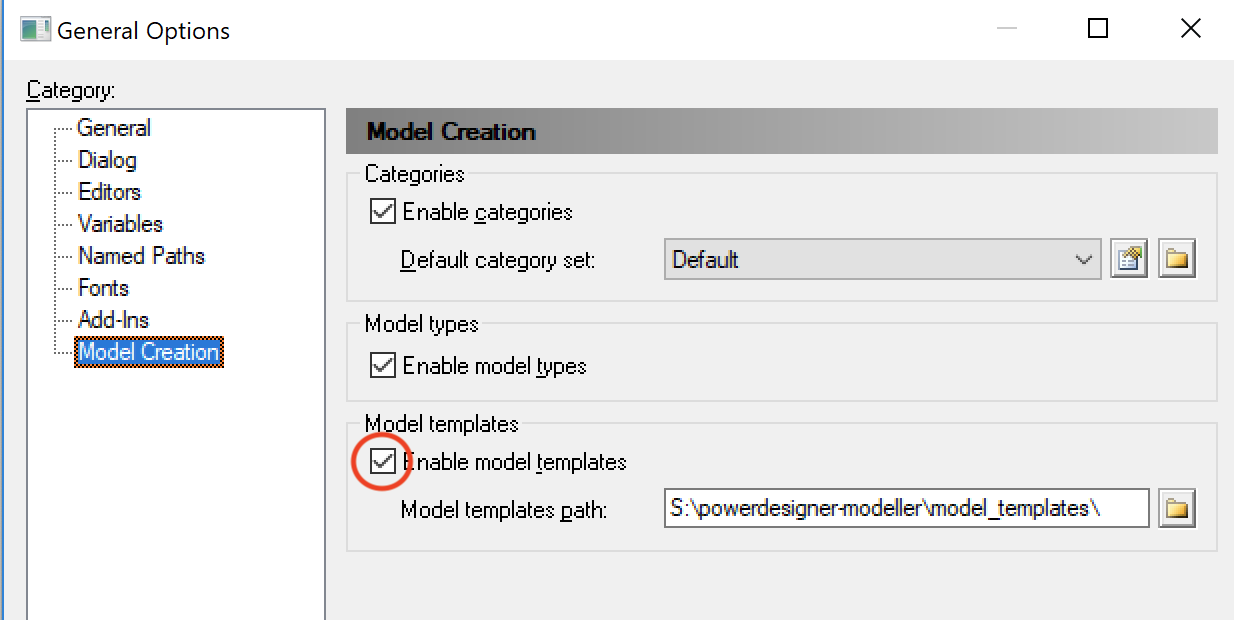
Set the path to a shared drive where modellers can use the template models.
Use
From the Powerdesigner menu File → New Model → Templates you can create a new model based on each of these templates:
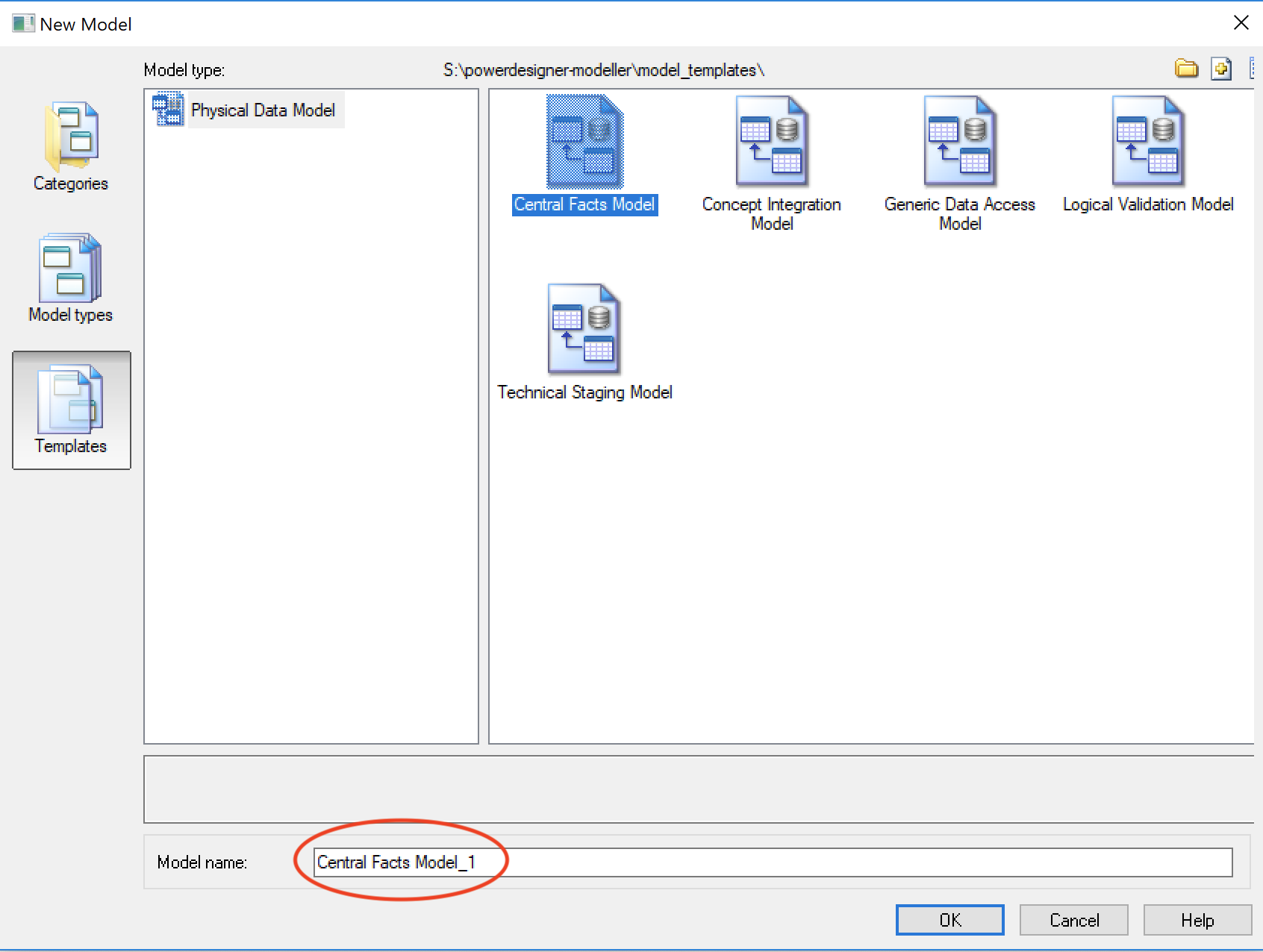
Each of the templates has predefined settings for:
- Model options
- Database generation
- A default schema and owner
- Model specific i-refactory settings such as the proper architectureLayer, staging template, ...
We have shipped 5 template models which you should customize to your specific needs. If you need assistance in customizing the templates to your specific needs please contact I-Refact.
Physical delete
In a central facts model we've added 2 additional properties on each anchor which will be added automatically to your existing model when you open it and the properties do not yet exist.
These additional properties register the state of an anchor regarding it's physical status. If an anchor is considered physically removed the property acm_physically_removed_ind is set to true and the property acm_physically_removed_by contains the modifier responsible for the physical delete.
The properties are set to false, null respectively if the anchor exists (or is recreated).
Info
During the upgrade to release 3.0.0 the anchor tables in the database are automatically extended with these new columns. The metadata for the anchor tables is automatically updated as well.
Impact for a generic data access model
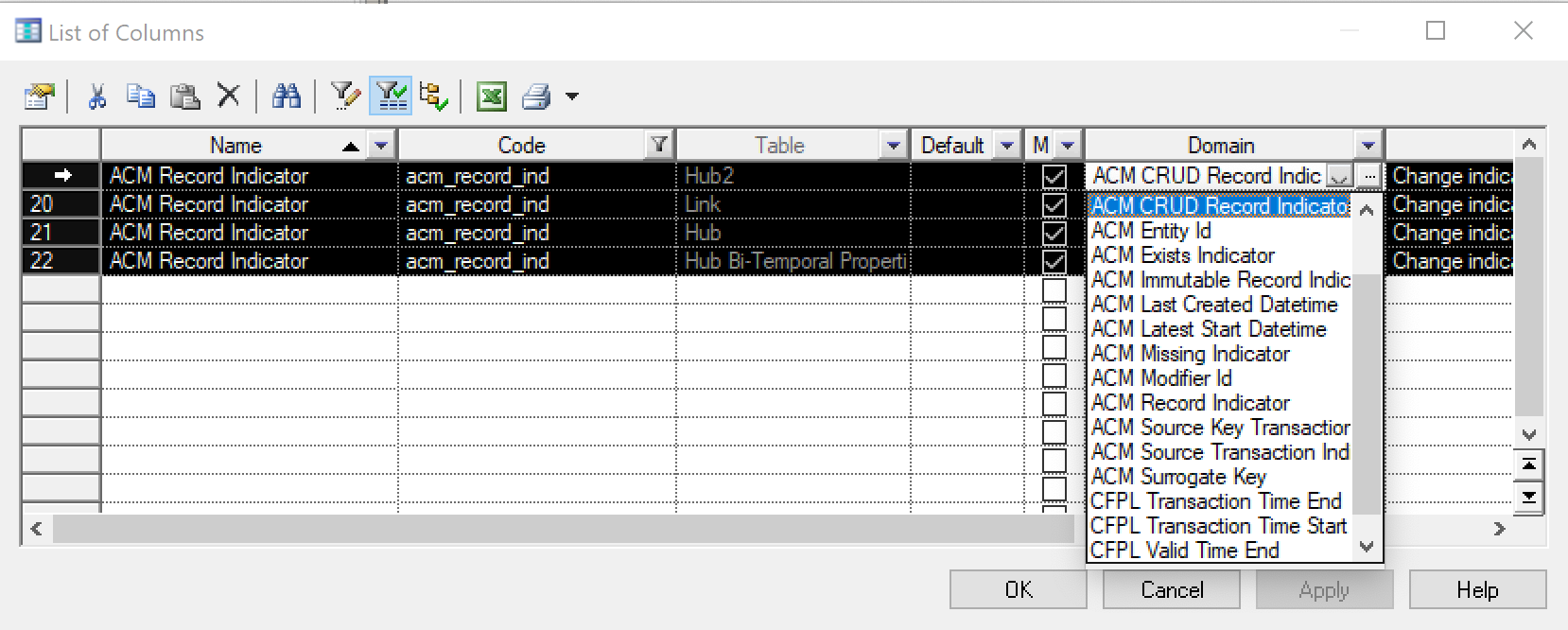
The property acm_record_ind in the GDAL model from now on will be related to the domain: acm_crud_record_indicator. This domain allows for setting the acm_record_ind to a value 'R' or 'D' for respectively setting the record to logically removed or physically removed.
This new domain is automatically added to the generic data access interface model as soon as you open it.
However, you should manually change the domain for the existing acm_record_ind columns. This can easily be changed in Powerdesigner with the "List of attributes" action, apply a filter on the acm_record_ind column, select all rows and choose to change the domain to acm_crud_record_indicator.
Info
When upgrading to release 3.0.0 the domain setting for the attribute acm_record_ind for each generic data access model will be updated automatically.
The views, stored procedures, ... will be automatically regenerated as well.
Export
We have changed the behaviour of exporting DDL and metadata for the models in your opened workspace.
You now have the option to set an export path, choose with models you would like to export and for each model the option to export DDL, metadata and/or schema's.
Selecting models and options
From an open model open the context menu and choose the menu item "Generate DDL and Metadata":
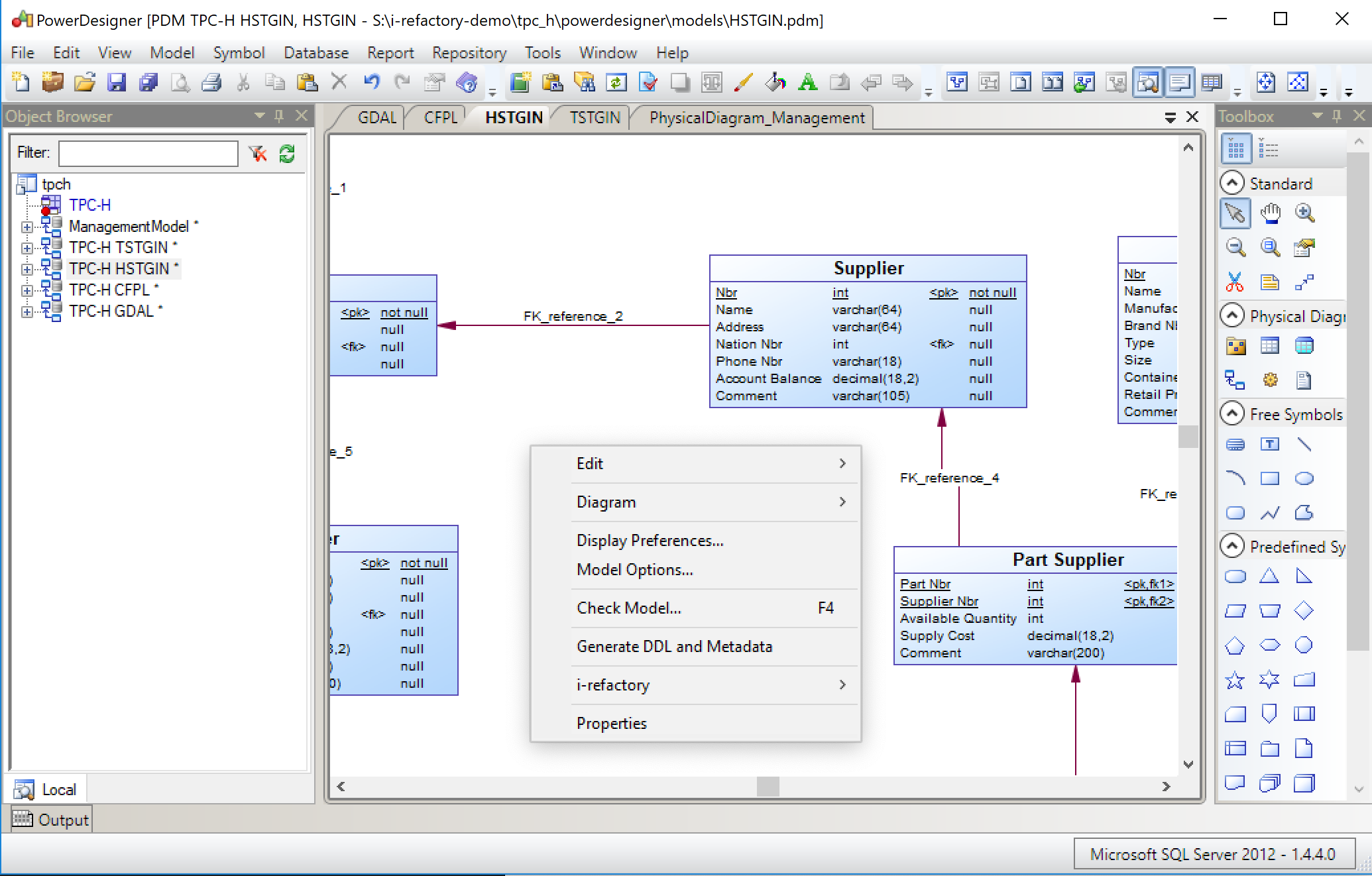
This results in a window that shows all your Workspace Opened Models:
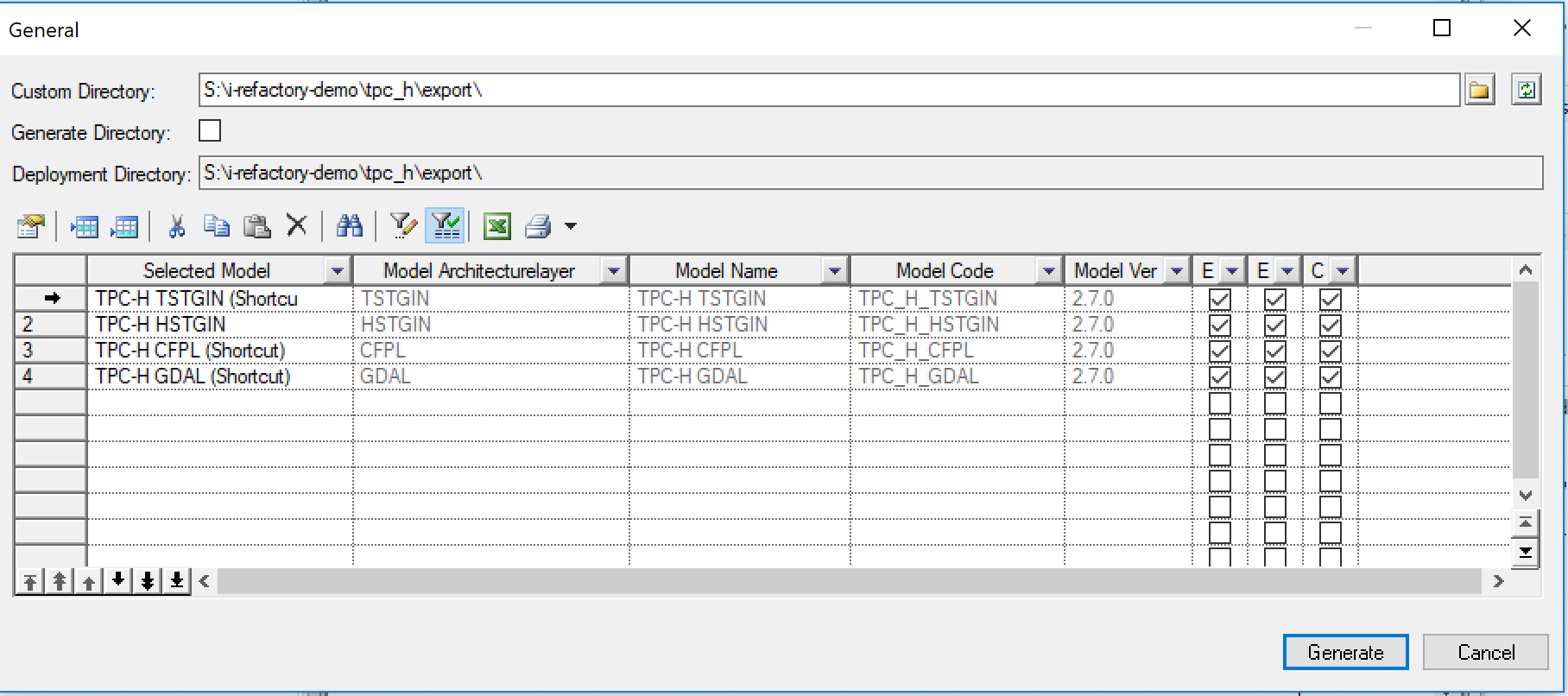
Warning
You should open all the models in your workspace. Models may have dependencies with other models such as mappings and relationships. If you export a model and an associated model in your workspace is not opened Powerdesigner is not able to resolve the shortcuts to the appropriate objects resulting in erroneous generated DDL and metadata.
You have the ability to:
- Change the directory to which the code should be generated.
- Choose to auto generate a new directory which will be created in the directory as specified in the
IREFACTORY_EXPORT_PATHnamed variable. - Choose not to generated DDL and metadata for a model by removing it from the list. To refresh the list of all opened models click the refresh button.
- Decide which items should be generated: DDL, Metadata, Schema's.
For each of the selected models the requested code will be generated.
Code generation
- We now have the capability to generate code and install scripts without the restriction that only a predefined set of databases are supported (the typical default database for each layer). The code generators now take into account the database that is attached to a model.
-
An
install.sqlscript is generated in the root export directory. The contents of the scripts will execute the install for each of the exported models.The script execution is wrapped in a transaction. If one of the install steps fails the transaction is rolled back. So no intermediate and inconsistent state is left behind.
The install.sql script is overwritten each time you run an export but only if at least one model is chosen for which to export the DDL script. The install.sql script will only execute the install for the models for which you have chosen to export DDL code.
The install script will not drop existing objects, always creates objects, despite the fact if they already exist, and doesn't take care of delta deployments.
You should remove existing objects or install to a clean environment. Or use a tool like Redgate to create a delta deployment script, which is our recommended tool of choice as it is easy, fast and reliable in creating delta scripts.
-
A powershell install script is generated as well. It's a simple though effective way to install via Powershell. It will allow for installing on Linux systems. For example: install the DDL on a Microsoft SQL Server Linux Docker container.
- All filenames are from now on generated in lowercase. This enables installing on Linux systems with expected behaviour.
- The installer scripts from now on use a forward slash to allow for installs on Linux systems.
- For GDAL models DDL files were generated despite the fact that these files did not create any objects. These files are not generated anymore.
GDAL Generation
- When generating a GDAL model from a CFPL model we will use the GDAL template so we will get a consistent markup of GDAL models.
- A physical diagram and symbols for each of the generated entities and relationships is now generated.
- If a CFPL model contains a generalisation anchor the generalization anchor is now generated.
- A GDAL object is now generated for a Generalisation Anchor.
- The domain
acm_crud_record_indicatoris added to a GDAL model and will be used as the domain for the attribute:acm_record_ind. - A check is added on auxiliary columns: they should participate in a relation.
- Creating references takes into account the owner of the parent entity. But for links the reference names in the CFPL still should have a unique name.
Other Improvements and Changes
Indexes on technical staging models
You now have the ability to create indexes on technical staging models. Well, at least the are created in the DDL generation.
Unique / primary key indexes
- You should not create unique indexes as this will prevent loading data which contains duplicates.
- We also do not automatically create a unique index if you create a primary key on a table in a technical staging model.
Primary keys in technical staging models
You now have the ability to create a primary key on technical staging models. The primary key is not physically implemented but is exported as metadata.
The physical not null constraint which is automatically added by Powerdesigner on primary key columns will not be created either (as this prevents loading data which violates the primary key constraint).
Checks
| Check | Description |
|---|---|
| Cyclic mappings | A new check is added which checks if cyclic mappings exists between helpers. An example is when you create a helperA which is a source input for helperB and add helperB as a source for helperA. |
| Not allowed to map to surrogate ID | When you map to the identity column of a anchor you will now get a check error when executing the model checks. |
| Auxiliary columns should be a reference | When you validate the GDAL model you will get a check error if an auxiliary column on a table exists which does not participate in a relationship join. Auxiliary columns in a GDAL should only exists as a result of a relationship to a parent entity and therefore should always participate in a join. |
| Identity setting | A new check is added for surrogate key columns. The Identity setting should be true for all anchors not being a subtype and false for all other entities. The check will return an error if this constraint violates. |
| Parent Key of Reference | Each reference should have a parent key set in its properties. This constraint is checked during the model validation and will result in an error in case the parentKey of a reference is not set. |
| Datasource read only | For mapping between Technical Staging and Logical Validation and between Logical Validation and Central Facts models the datasource setting is now checked to be read only. |
| One table source | A context entity in a central facts model can be mapped to by only one LVL or CFPL Helper source entity. If a context entity is mapped to by more than one LVL and/or CFPL Helper entity an error is reported during model validation. |
| Column should have a mapping | Isn't executed anymore for helper entities. |
| Satellite should have a column | Now takes into account reference columns as well. |
Changes
Changes in metadata properties for a model
We no longer export the attributes: "DDL Version", "RDBMS Version" and "Metadata Export Version" on model (interface) level.
Instead we now export the following properties: "Exported for irefactory schema version", "Requires irefactory application version", "Created with irefactory modeller version".
With each release of the Powerdesigner UAM Modelling components we will internally set the proper values for these metadata properties.
Icons in a Central Facts model
The icons for temporal/bitemporal context have changed.
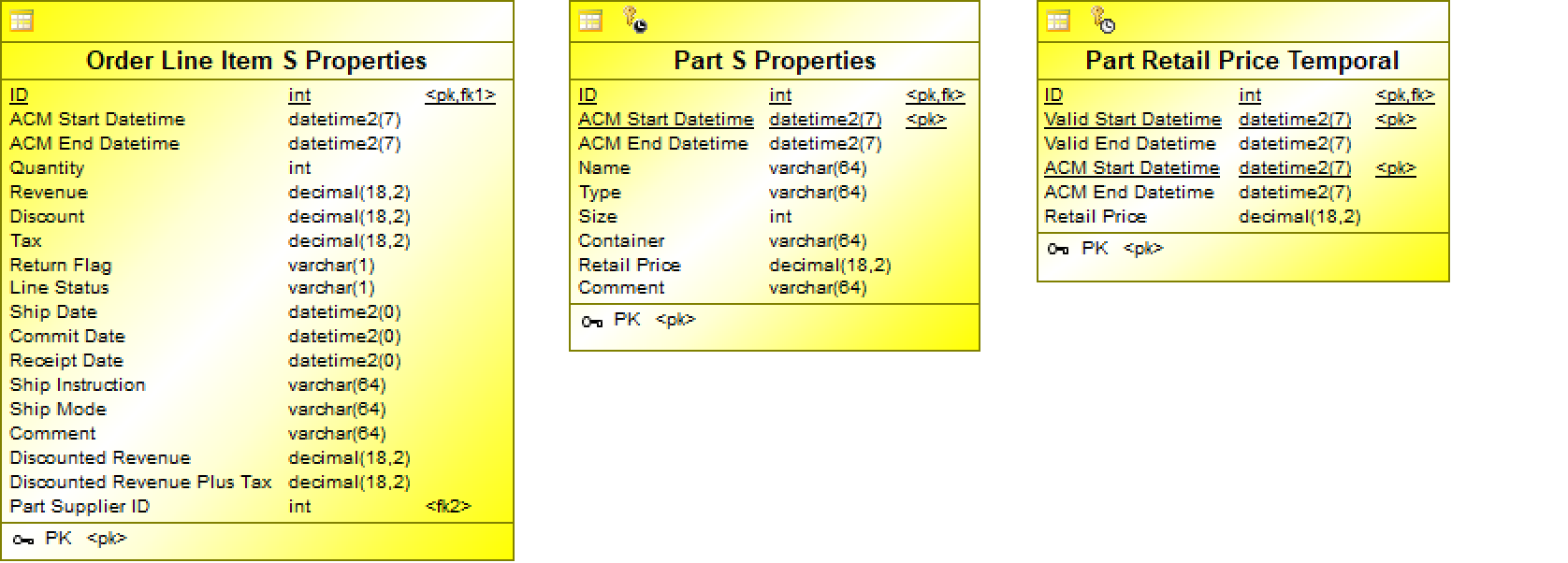
An immutable context has no icon for temporality, a transactional context has a black clock, a bitemporal context a white clock.
References for derived anchors or context
References in a CFPL are now created for derived anchors and context as well.