How to create a Central Facts Model
In this section we explain the steps you need to follow to create a central facts model.
- Step 1. Adding an empty model
- Step 2. Converting independent entities
- Step 3. Converting dependent entities
- Step 4. Aligning with the integration patterns
- Step 5. Converting foreign key relationships
- Step 6. Creating mappings
- Step 7. Aligning with a logical validation model
- Step 8. Adding business rule helpers
- Step 9. Creating context-based entities
At any moment, you can perform a model check to verify if there are errors in the model.
Example - Part 1
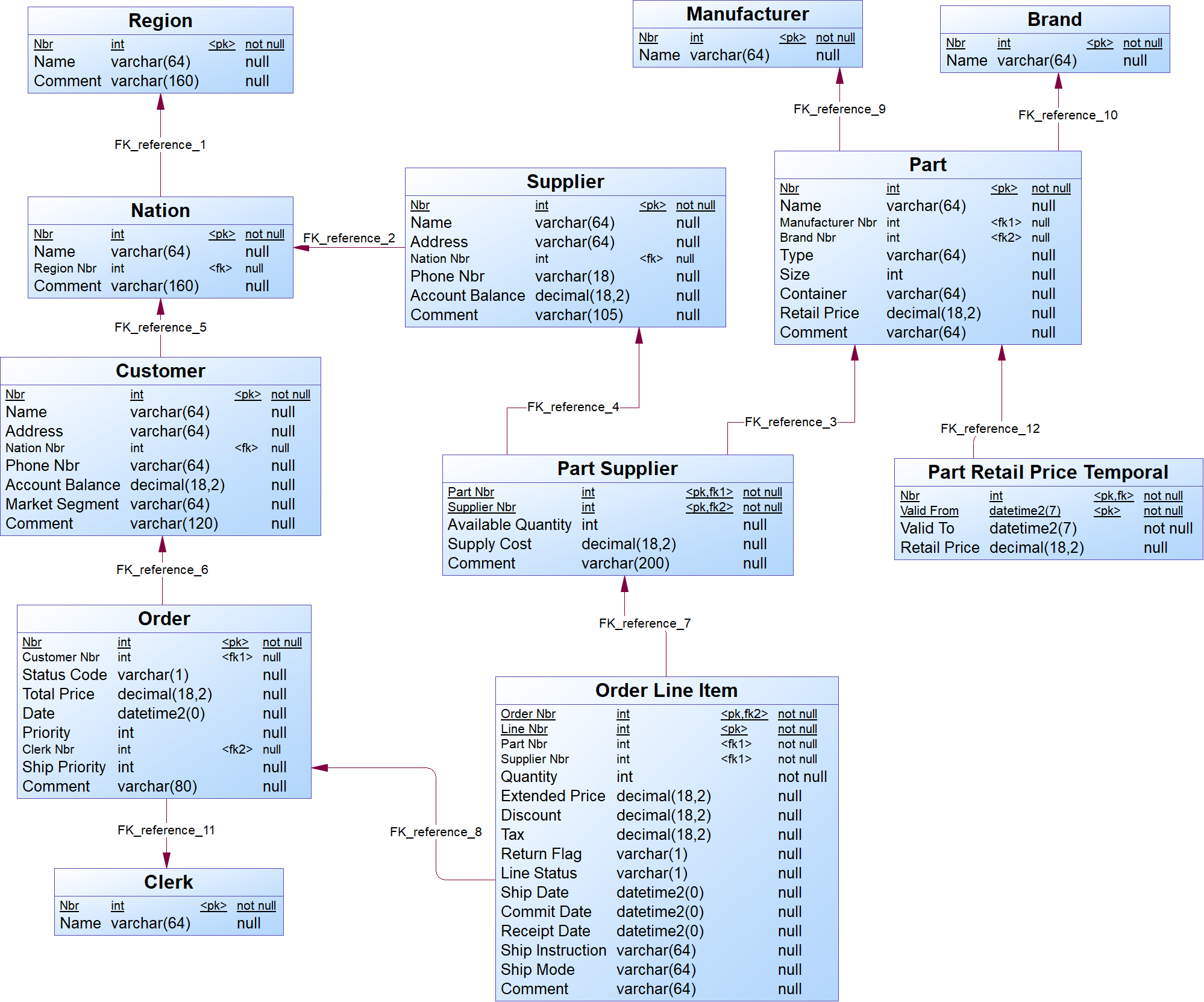
The logical validation model below is used as an example. It represents the entities and relationships of the TPCH benchmark.
Before you begin
Before you begin to convert the LVM constructs (entities, attributes and references) to CFM constructs (hubs, links, satellites and references), you need to figure out the independent and dependent entities from the LVM.
An independent entity does not rely on another entity for identification. A dependent entity is one that relies on one or more entities for identification. In other words, the identification of an independent entity does not depend on a foreign key, while a dependent entity depends on a foreign key for uniqueness.
Example
In our example, Order, Customer and Supplier are independent entities. Part Supplier and Order Line Item are examples of dependent entities.
The Order Line Item depends on the Order entity. This dependency is represented by a reference from Order Line Item to Order and the foreign key attribute Order Nbr as part of the primary key of Order Line Item. In this case, the dependent entity Order Line Item is the child entity of the reference, while the independent entity Order is the parent entity of the reference.
A dependent entity can be further classified as:
- Associative (relationship) entity: when there are many to many relationships between two or more entities in the LVM, then an associative entity is created. The existence of an associative entity depends on more than one entity, which is represented by a reference from the associative entity to each entity on which it depends for its existence (the associative entity is the child, and the referenced entity is the parent of the reference). As a result, the primary key of the associative entity is a composition of the primary keys of each one of its parent entities.
Example
In our example, Part Supplier is an Associative entity created to represent the many to many relationship between Part and Supplier (a part can have multiple suppliers and a supplier can supply multiple parts). The attributes Available Quantity, Supply Cost and Comment describe this relationship between parts and suppliers.
- Regular dependent entity: to ensure the uniqueness of the dependent entity, the primary key of the dependent entity is composed by its partial key and the primary key of the entity on which it depends for its existence.
When an entity has one or more attributes associated to a valid time (“valid from” and “valid to”), then we have a special case of regular dependent entity, called bi-temporal entity. The primary key of the bi-temporal entity is composed by the primary key of the parent entity and the “valid from” attribute. The attribute associated to the valid time is also an attribute of the bi-temporal entity.
It is possible that an entity depends on more than one entity. In this case, the primary key of the regular dependent entity is composed by the partial key of the dependent entity together with the primary key of all parent entities on which the entity depends for its existence.
Example
Order Line Item has the attribute Line Nbr, whose values are unique in the context of a given order. However, different orders can have one or more line numbers with the same value. In this case, Line Nbr is a partial key because it does not uniquely identify order line items from different orders.
A reference from Order Line Item to Order ensures the uniqueness of each order line item. The primary key of Order Line Item is composed by its partial key (Line Nbr) and the primary key of its parent entity Order (Order Nbr).
Example
In our example, Part Retail Price Temporal is a Bi-temporal entity that depends on Part. The Part Retail Price was created because the value of Retail Price is valid for a specific period.
Step 1. Adding an empty model
To start building a CFM, first you should create an empty central facts model from a template, then the model will have all the necessary default settings.
Step 2. Converting independent entities
After identifying the independent and dependent entities of the LVM, you can start the process of converting the LVM to a CFM. The first step consists of converting independent entities.
For each independent entity:
- Create a hub.
- For each attribute that compose the primary key of the independent entity, add a business key column to the new hub.
- Add a standard satellite for each subset of descriptive attributes that share the same timeline and are not part of a foreign key relationship. Even when the independent entity has no descriptive attributes, you need to add a standard satellite. Every hub should have at least one standard satellite to keep track of its existence.
- Add an immutable satellite for the attributes that will never change.
- Add descriptive attributes to the satellites.
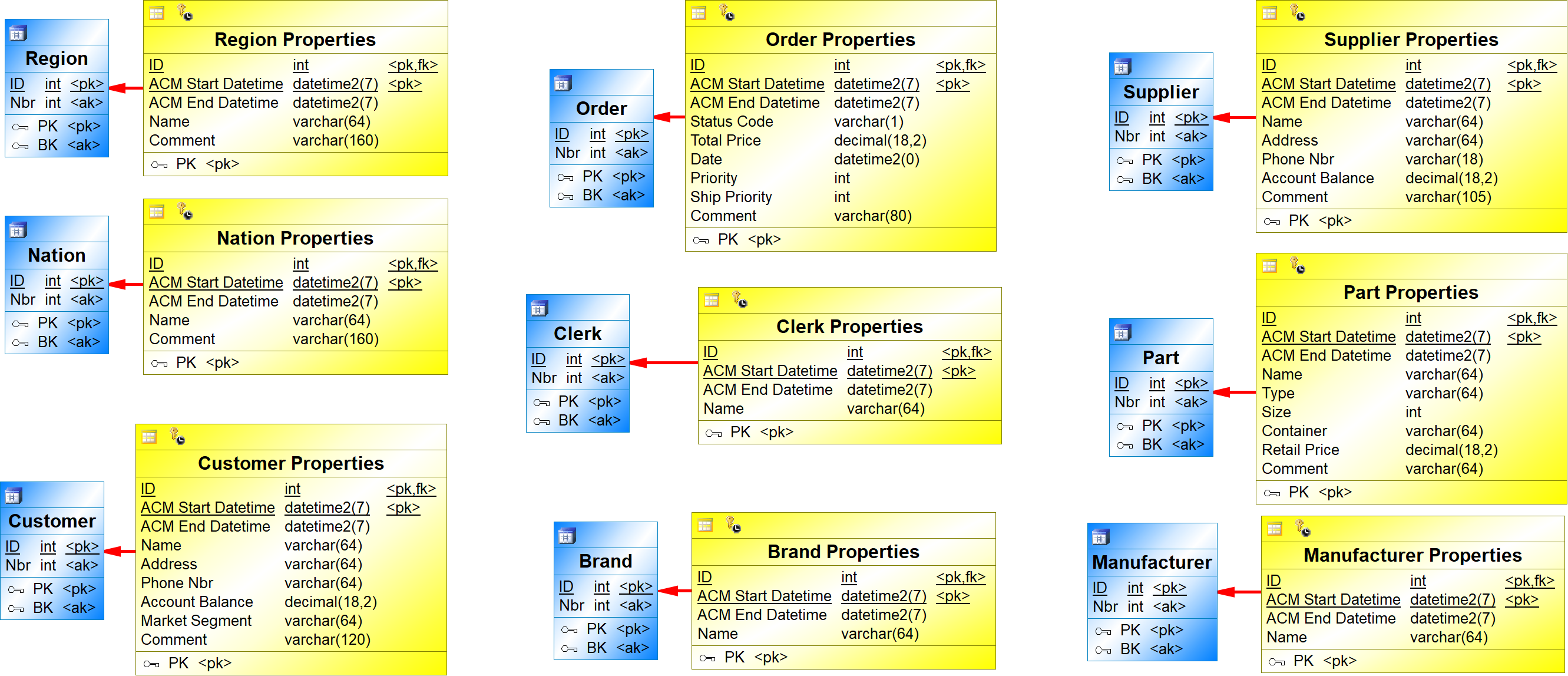
For the given LVM, the following hubs and satellites are created:
Step 3. Converting dependent entities
For each associative entity and for each regular dependent entity that depends on more than one entity:
- Create a link.
- If the entity has a partial key, then for each attribute that composes the partial key, add a link key column to the new link.
- Add a reference from the new link to each one of the entities referenced by the dependent entity. For each referenced entity, one foreign key is added to the link.
- Add a standard satellite for each subset of descriptive attributes that share the same timeline and are not part of a foreign key relationship. Even when the dependent entity has no descriptive attributes, you need to add a standard satellite. Every link should have at least one standard satellite to keep track of its existence.
- Add an immutable satellite for the attributes that will never change.
- Add descriptive attributes to the satellites.
Example
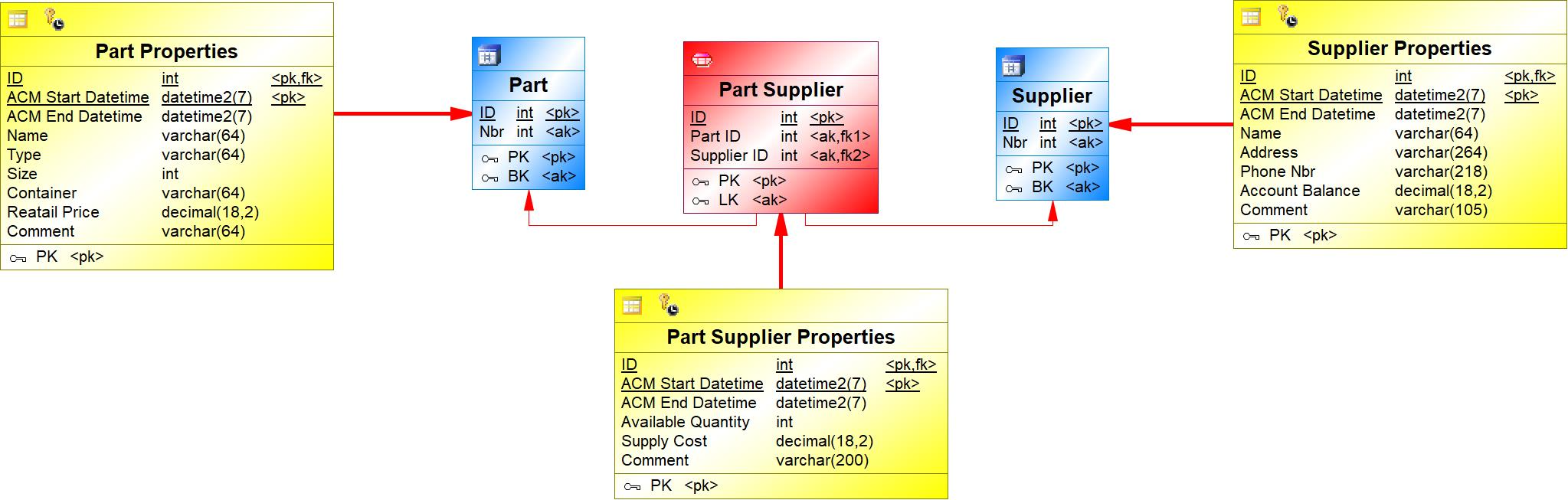
In our example, there are three dependent entities: Part Supplier, Order Line Item and Part Retail Price. Part Supplier gave origin to the link Part Supplier and the satellite Part Supplier Properties.
For each regular dependent entity that depends on just one entity and it is bi-temporal, you add a bi-temporal satellite.
- Add a bi-temporal satellite to the hub (or link) created for the entity referenced by the dependent entity, i.e., the entity on which it depends on its existence.
- Add the remainder attributes to the bi-temporal satellite.
Example
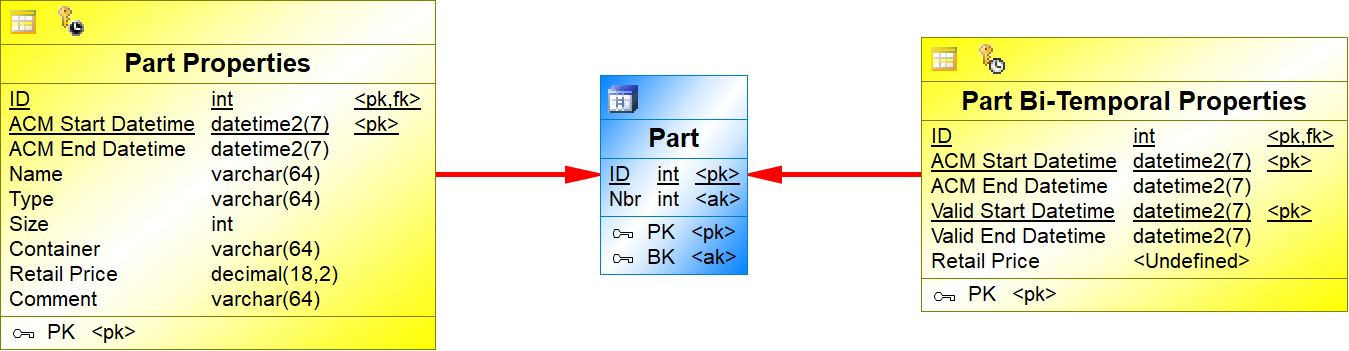
The bi-temporal entity Retail Price Temporal originates one bi-temporal satellite to keep track of the history of the attribute Retail Price.
For each regular dependent entity that depends on just one entity, but it is not bi-temporal, you have the option to create a link (see the steps above) or add a multi-active satellite.
- Add a standard satellite to the hub (or link) created for the entity referenced by the dependent entity, i.e., the entity on which it depends on its existence.
- For the partial key of the dependent entity, add a versioning key column to the new satellite as a versioning key column.
- Add the remainder attributes to the satellite.
Example
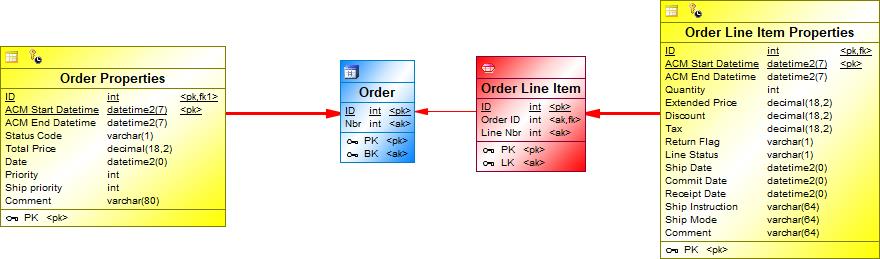
There are two options two convert Order Line Item. The first one is to create a link dependent on Order, add the partial key of Order Line Item as a link key column and add a satellite to Order Line Item with its descriptive attributes.
Example
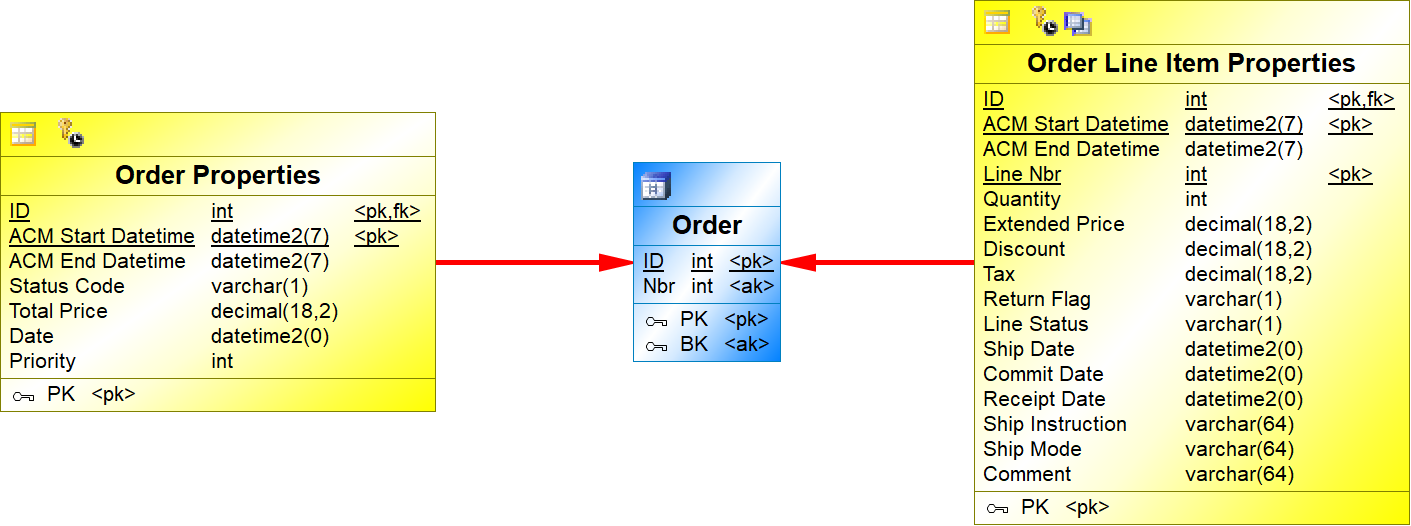
The second option is to add a multi-active satellite to Order with all attributes from Order Line Item and add the partial key Line Nbr as part of the primary key of the new satellite. The attribute Line Nbr is the versioning attribute of the multi-active satellite.
Example - Part 2
To show the use of the integration patterns, suppose a data source with information about customer's complaints. The LVM and the CFM for this data source are shown below.


Step 4. Aligning with the integration patterns
When you use integration patterns (key roots) to relate entities from different data sources, you need to add the relationships between the key roots and the corresponding hubs (or links).
If the key root belongs to a different model, for example a Concept Integration Model, then:
- Add a shortcut for this key root in the central facts model.
- For each entity (hub or link) in the central facts model, related to this key root, add a subtype reference from the entity to the shortcut added for the key root.
Example
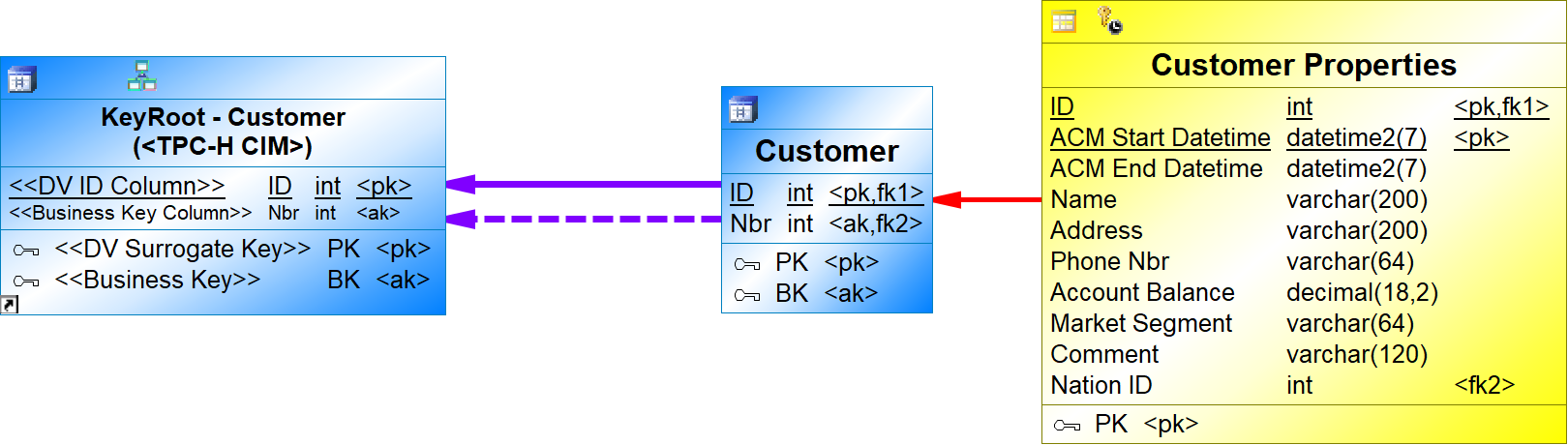
Suppose that an integration pattern (KeyRoot-Customer) is created, in a Concept Integration Model, to integrate data about customers. A shortcut for this key root and a subtype reference from Customer to the KeyRoot-Customer are added to the central facts model.
If you opt for adding the integration pattern directly in the central facts model, then:
- Create a key root.
- For each entity (hub or link) in the central facts model, related to this key root, add a subtype reference from the entity to the new the key root.
Example
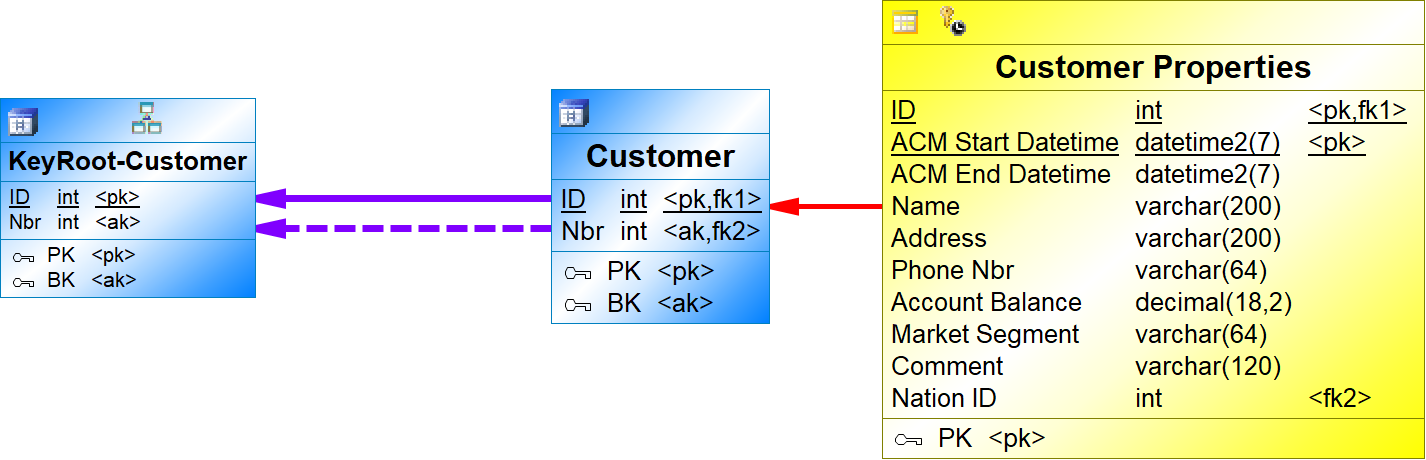
Now, suppose that the key root for customers does not need to be shared and there is no Concept Integration Model. In this case, a key root for customers and a subtype reference from Customer to the KeyRoot-Customer are added directly to the central facts model.
Step 5. Converting foreign key relationships
For each nonkey attribute that refers to a key attribute in a foreign key relationship identified in the corresponding LVM:
-
Option 1: Add a reference from one of the satellites of the hub (or link) that includes the nonkey attribute to the hub (or link) that holds the key attribute; or
-
Option 2: First, add a foreign key link, then add a reference from the new foreign key link to the hub (or link) that holds the nonkey attribute, and add a reference from the new foreign link to the hub (or link) that holds the key attribute. You choose this option if you want to track the changes of this relationship over time.
Example
In our example, the entity Order has foreign key relationships with Customer and Clerk. To represent this in the CFM, a reference was added from the satellite Order Properties to the hubs Customer and Clerk, respectively. The entity Order Line Item has a foreign key relationship with Part Supplier, which originates a reference from the satellite Order Line Item to the link Part Supplier.
This is the CFM obtained after converting the given LVM:

Step 6. Creating mappings
Mappings in a central facts model are mainly used to specify how to populate entities in a CFM from entities in a LVM. Besides these mappings, there are two special types of mappings in a central facts model:
-
Master mappings: is a special type of mapping used to identify existence of entities. A mapping is a master mapping if the business key of the anchor is equal to the primary key of the corresponding source entity (an entity in a LVM) that is mapped to the anchor. An anchor must have exactly one master mapping, i.e. the business key attributes of an anchor can be mapped to only one entity in a logical validation model.
-
Integrity mappings: you use integrity mappings to deal with referential integrity constraints between entities in a central facts model. Suppose that there is a foreign key in entity B that refers to the primary key of entity A and these two entities are not always populated at the same time. This means that, in a given moment, entity B may have a value for the foreign key that does not yet exists as a primary key in entity A. If no actions are taken, the loading process will fail due to the referential integrity constraint.
To avoid this fail, you can create an integrity mapping. These mappings make sure that all foreign key values of entity B are also populated as primary key values of entity A. Doing this, the referential integrity constraint is respected even when the corresponding instance of entity A does not yet exist. This instance "will exist" only when entity A also provides the new value. In this case, the data in the central fact layer will be eventually consistent.
Example
In our example, there is a referential integrity constraint between the entities Supplier and Nation. Suppose that Nation is delivered at a different time than Supplier. In this case, you can create an integrity mapping to prevent the fail of a delivery when a supplier is delivered with a value for the attribute nation that does not exist yet as a primary key in the entity Nation.
To create a mapping between entities or attributes from the logical validation model (source model) to the central facts model (target model), first you need to select the source and target models. After this, you can create the mappings.
For each new hub, add the mappings between the corresponding independent entity in the LVM and the new hub in the CFM:
- Map each attribute that compose the primary key of the independent entity to the corresponding business key attributes added to the new hub.
- Map the attributes that compose the primary key of the independent entity to the primary key (ID) of each one of the satellites added to the hub.
- If necessary, map the descriptive attributes from the independent entity, which are not part of a foreign key relationship, to the corresponding satellites (standard or immutable) created for the hub.
- If necessary, map the foreign key descriptive attributesfrom the independent entity, to the corresponding foreign key attributes of the satellites created for the hub.
Example
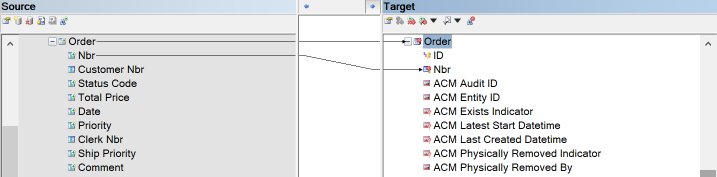
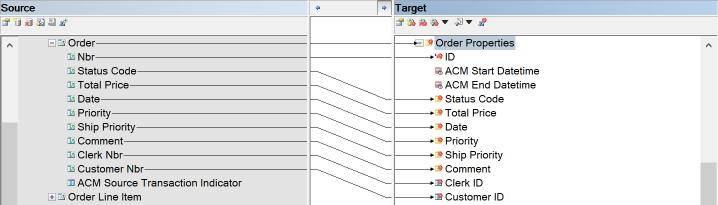
In our example, the independent entity Order in the LVM is mapped to the hub Order and the satellite Order Properties. The primary key Nbr from the entity Order is mapped to the business key Nbr of the hub Order and to the primary key (ID) of the Order Properties satellite. The descriptive attributes of the entity Order are mapped to the corresponding attributes of the satellite Order Properties. The foreign key attributes Clerk Nbr and Customer Nbr are mapped to the corresponding foreign key attributes Clerk ID and Customer ID, respectively.
For each new link, add mappings between the corresponding dependent entity in the LVM and the new link in the CFM:
- Map the foreign key attributes that compose the primary key of the dependent entity to the corresponding foreign key attributes added to the link.
- Map the attributes that compose the partial key of the dependent entity to the corresponding link key columns added to the new link.
- Map the attributes that compose the primary key of the dependent entity to the primary key (ID) of each one of the satellites added to the link. The order of the attributes from the primary key should be respected when creating a mapping to the primary key of the link. You can check the order of the mappings and, if necessary, you can change the order of the mappings.
- Map the descriptive attributes from the dependent entity, which are not part of a foreign key relationship, to the corresponding satellites (standard or immutable) created for the link.
Example
In our example, the dependent entity Part Supplier in the LVM is mapped to the link Part Supplier and to the satellite Part Supplier Properties. The foreign key attributes Part Nbr and Supplier Nbr are mapped to the corresponding attributes Part ID and Supplier ID of the link Part Supplier and to the primary key (ID) of the Part Supplier Properties satellite. The descriptive attributes of the entity Part Supplier are mapped to the corresponding attributes of the satellite Part Supplier Properties.


For each new multi-active satellite, add the mappings between the corresponding dependent entity in the LVM and the new multi-active satellite in the CFM:
- Map the partial key of the dependent entity to the corresponding versioning key columns added to the satellite.
- Map the foreign key attributes that reference the entity on which the entity depends on its existence to the primary key (ID) of the satellite.
- Map all the descriptive attributes of the dependent entity, which are not part of a foreign key relationship, to the new satellite.
Example
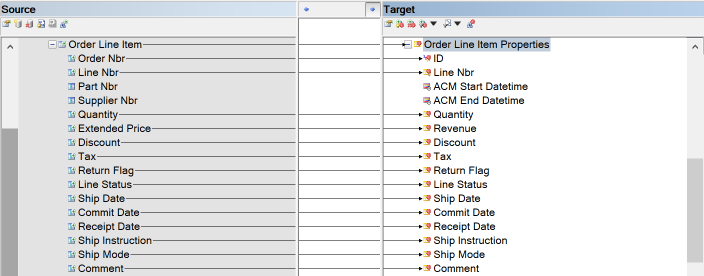
In our example, the dependent entity Order Line Item in the LVM is mapped to the multi-active satellite Order Line Item Properties. The foreign key attribute Order Nbr is mapped to the primary key (ID) of the multi-active satellite. The partial key Line Nbr is mapped to the corresponding attribute Line Nbr of the multi-active satellite. The descriptive attributes of the entity Order Line Item are mapped to the corresponding attributes of the multi-active satellite Order Line Item Properties.
For each new bi-temporal satellite, add the mappings between the corresponding dependent entity in the LVM and the new bi-temporal satellite in the CFM:
- Map the valid time attributes (“valid from” and “valid to”) to their corresponding attributes in the new satellite.
- Map the foreign key that references the entity on which the dependent entity depends on its existence to the primary key (ID) of the satellite.
- Map all the descriptive attributes of the dependent entity, which are not part of a foreign key relationship, to the new satellite.
Example
In our example, the dependent entity Part Retail Price in the LVM is mapped to the bi-temporal satellite Part Retail Price Temporal. The attributes Valid From and Valid To are mapped to Valid Start Datetime and Valid End Datetime attributes, respectively. The foreign key attribute Order Nbr is mapped to the primary key (ID) of the bi-temporal satellite. The attribute Retail Price is mapped to the corresponding attribute Retail Price of the bi-temporal satellite.

For each foreign key link, add the mappings between the corresponding entities in the LVM and the new foreign key link:
- Map the attributes that compose the primary key of the entity that holds the key attribute to the primary key (ID) of the foreign key link.
- Map the attributes that compose the primary key of the entity that holds the non key attribute to the corresponding foreign key attributes added to the foreign key link.
Example - Part 3
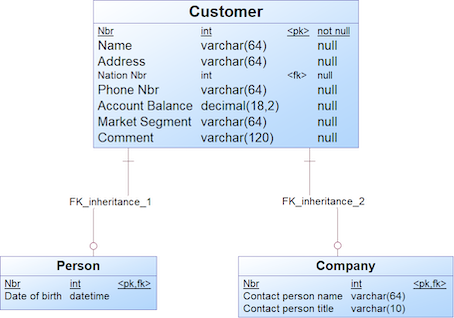
To show the use of subtypes and generalization, suppose that in the TPC-H data source a Customer is either a Person or a Company. This means that persons and companies share their identification and are described by the same attributes.
When a customer is a person, besides the common attributes that describe both persons and companies, then the customer has an extra attribute Date of birth.When a customer is a company, besides the common attributes that describe persons and companies, then the customer has two additional attributes Contact person name and Contact person title.
In this case, Customer is considered a supertype and Person and Company are subtypes.
Step 7. Aligning with a logical validation model
Once you have the hubs and links, you may align the central facts model with the logical validation model in the following ways.
Step 7.1 Adding specializations
You can add supertype/subtype relationships to a CFM to better reflect choices made at the Logical Validation Layer.
For each supertype/subtype relationship between two entities in the logical validation model, add a subtype reference from the hub (or link) created for the supertype entity to the hub (or link) created for the subtype entity. A hub can have only "hub subtypes", while a link can have only "link subtypes".
Example
In our example, to reflect the fact that Person and Company are subtypes of Customer, two new hubs are created (Person and Company) and a subtype reference from each new hub to the hub Customer is added to the central facts model.

Step 7.2 Adding generalizations
You can add a hub to represent a generalization of other existing hubs, and add a context on the generalization level with the common attributes shared among the related hubs. Remember that hubs related through the generalization do not need to share the same business key.
To create a generalization:
- Add a generalization hub.
- Add a hyponym reference from each hub (or link), for which you create the generalization, to the new generalization.
Example
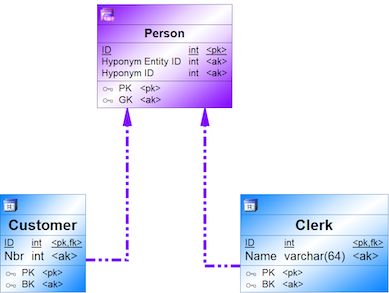
In our example, customers place an order and clerks handle the order. However, a clerk can also be a customer and place an order. In this case, Customer and Clerk can be generalized as a Person. To reflect this, a generalization (Person) is added to the central facts model and and an hyponym reference from Customer (and Clerk) to Person is also added.
Step 7.3 Adding alternate key satellites
You can add an alternate key satellite to a hub (or link) to place an additional uniqueness constraint on its attributes (either being descriptive or reference attributes). The uniqueness constraint only checks if the combination of the current values of all context attributes is unique for each key in its anchor, not if the combination is unique across the entire transaction timeline. This option tracks alternate key(s) separately and implements a uniqueness constraint for the alternate key(s).
Info
If you have multiple alternate keys that are unique individually but not combined, you have to create one alternate key context per alternate key.
Example
In our example, suppose that the entity Part has an alternate key composed by the attributes Name and Manufacturer Nbr. An alternate key satellite can be added to the hub Part to ensure the uniqueness of the combination of these two attributes.
Step 8. Adding business rule helpers
You can add business rule helpers to the central facts model to perform calculations or derivations that use data outside of the current delivery or historical versions of the data. Existing entities from the central facts model are the input for the helper and its results can be materialized in an existing hub or satellite.
Example
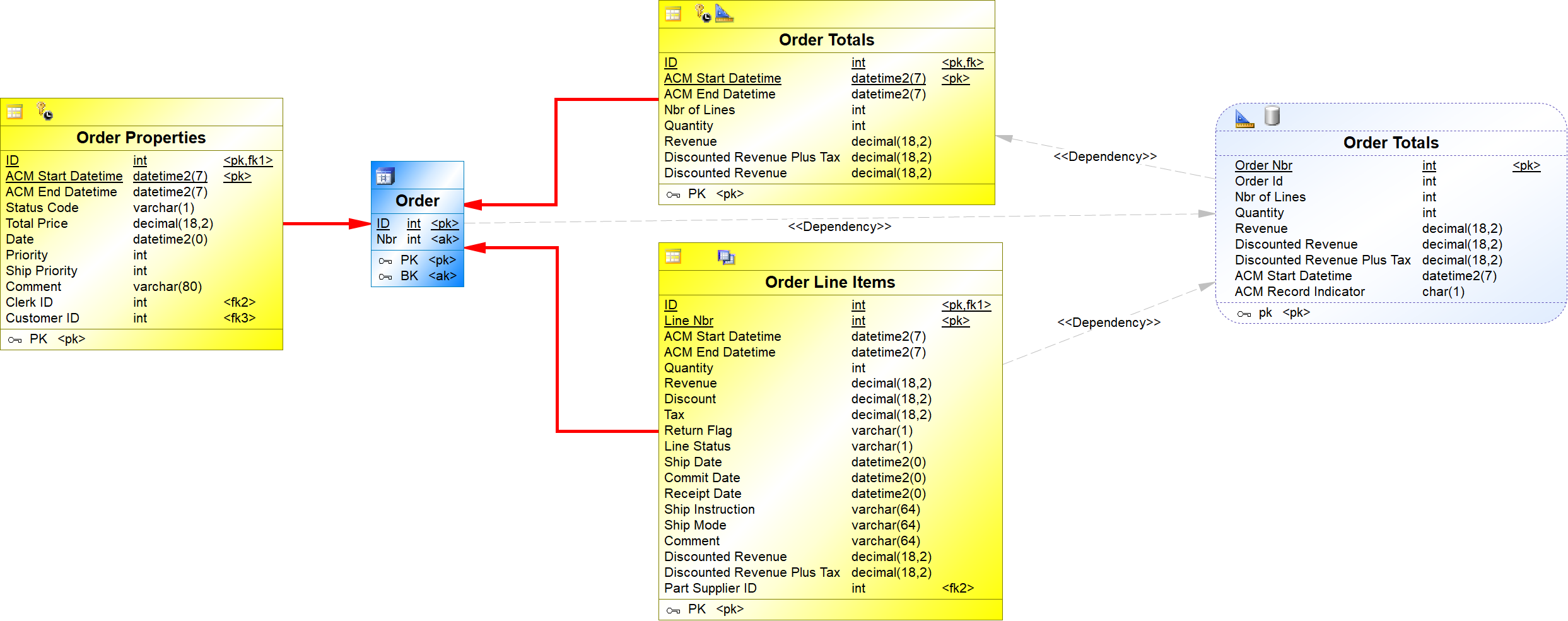
In our example, an order may have multiple order line items, which describe the items of a specific order. The business rule helper Order Total is used to compute values related to the whole set of order line items of a specific orde and the satellite Order Totals stores the computed values.
Step 9. Creating context-based entities
You create a context-based entity in the central facts layer to reflect the choices made for context-based entities in the logical validation layer. In the case of an untrusted delivery, i-refactory will use the context-based entity parameters for data processing in the central facts model.
Example
In our example, there is a context relationship between Part and Part Supplier: Part is the parent context of the entity Part Supplier. Suppose that all suppliers for just one single part are delivered, i.e. Part Supplier is delivered as a full set and Part is delivered as delta set. Since there is only focus on the specific part that you specify in the delivery, all data of the other parts remains unchanged. In this case, in order to allow implicit delete detection, the existing set of Part Suppliers must be filtered based on the context of its parent context. To allow this, the option 'Use as context filter' of the reference between Part and Part Supplier should be checked.